A Fiddler alternative that works the same on macOS and Windows
GraphDagger's Web Debugger gives you Fiddler's core, HTTPS inspection, breakpoints, AutoResponder-style mapping and scripting, as one native app that behaves identically on both platforms.
Fiddler Classic is a Windows institution: free, scriptable and everywhere .NET developers work. It is also Windows-only, and its successor moved the workflow to a subscription with a different feature set, which is exactly the moment teams re-evaluate.
GraphDagger's Web Debugger is a full replacement. Live HTTP and HTTPS capture with full request and response inspection, request and response breakpoints, Map Local and Map Remote in place of AutoResponder rules, a rule engine with a dedicated DSL, and a JavaScript scripting engine where FiddlerScript would have been. HTTP/2, WebSocket, gRPC and SSE are inspected natively, and sessions move in and out as HAR.
GraphDagger vs Fiddler, feature by feature
| Capability | Fiddler | GraphDagger |
|---|---|---|
| Platforms | Fiddler Classic is Windows-only | One native app for macOS and Windows, identical on both |
| HTTPS decryption | HTTPS decryption via a root certificate | HTTPS interception with a generated CA and guided setup |
| Auto-responses | AutoResponder rules | Map Local and Map Remote, plus match and replace rules with a dedicated DSL |
| Scripting | FiddlerScript in JScript.NET | A JavaScript scripting engine, the language your team already writes |
| Breakpoints | Request and response breakpoints | Breakpoints to pause, edit and drop requests and responses |
| Modern protocols | HTTP/2 and WebSocket support varies by edition | HTTP/2, WebSocket, gRPC and SSE inspection built in |
| Session portability | SAZ archives, HAR export | HAR import and export plus CSV, so archived sessions carry over |
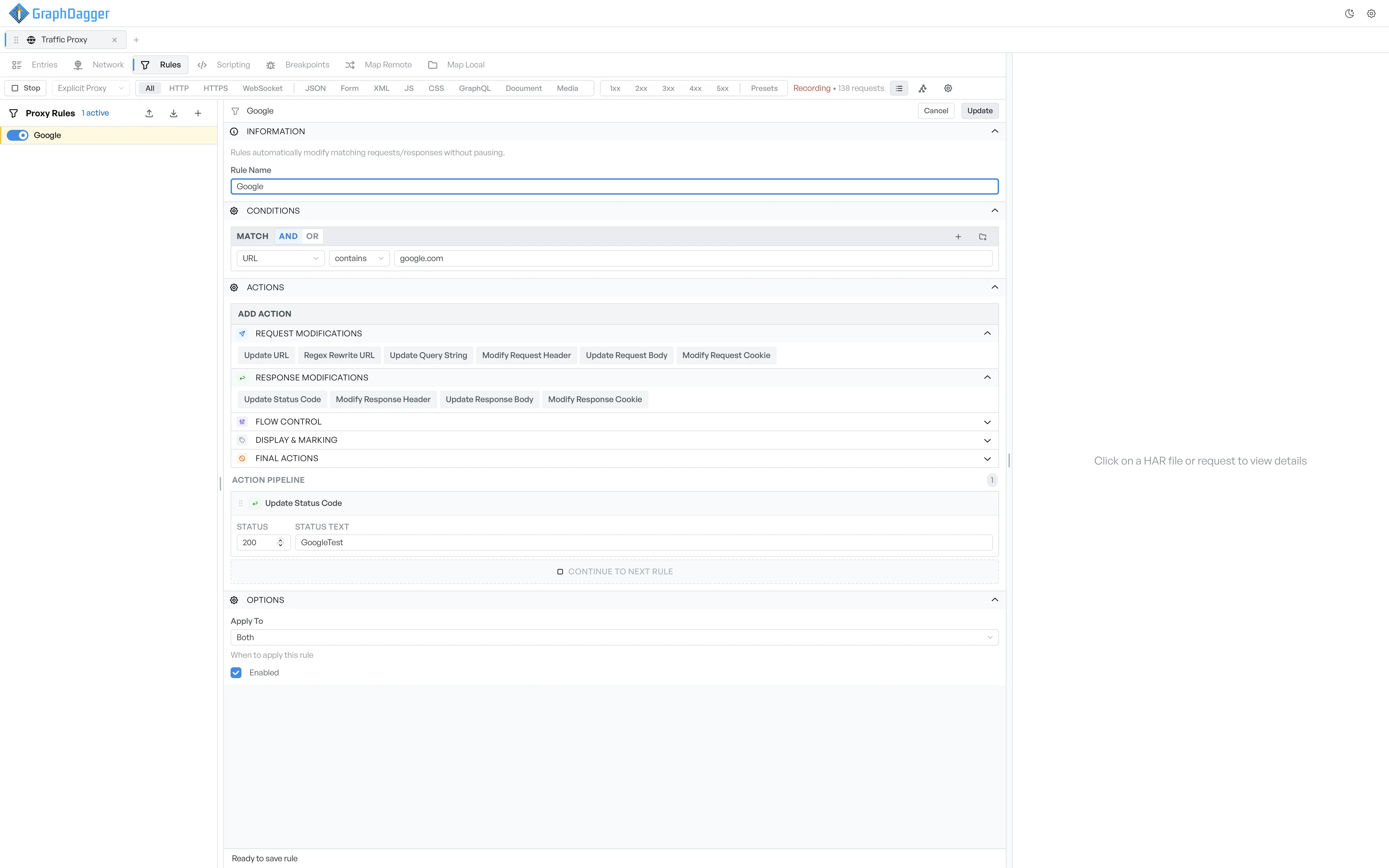
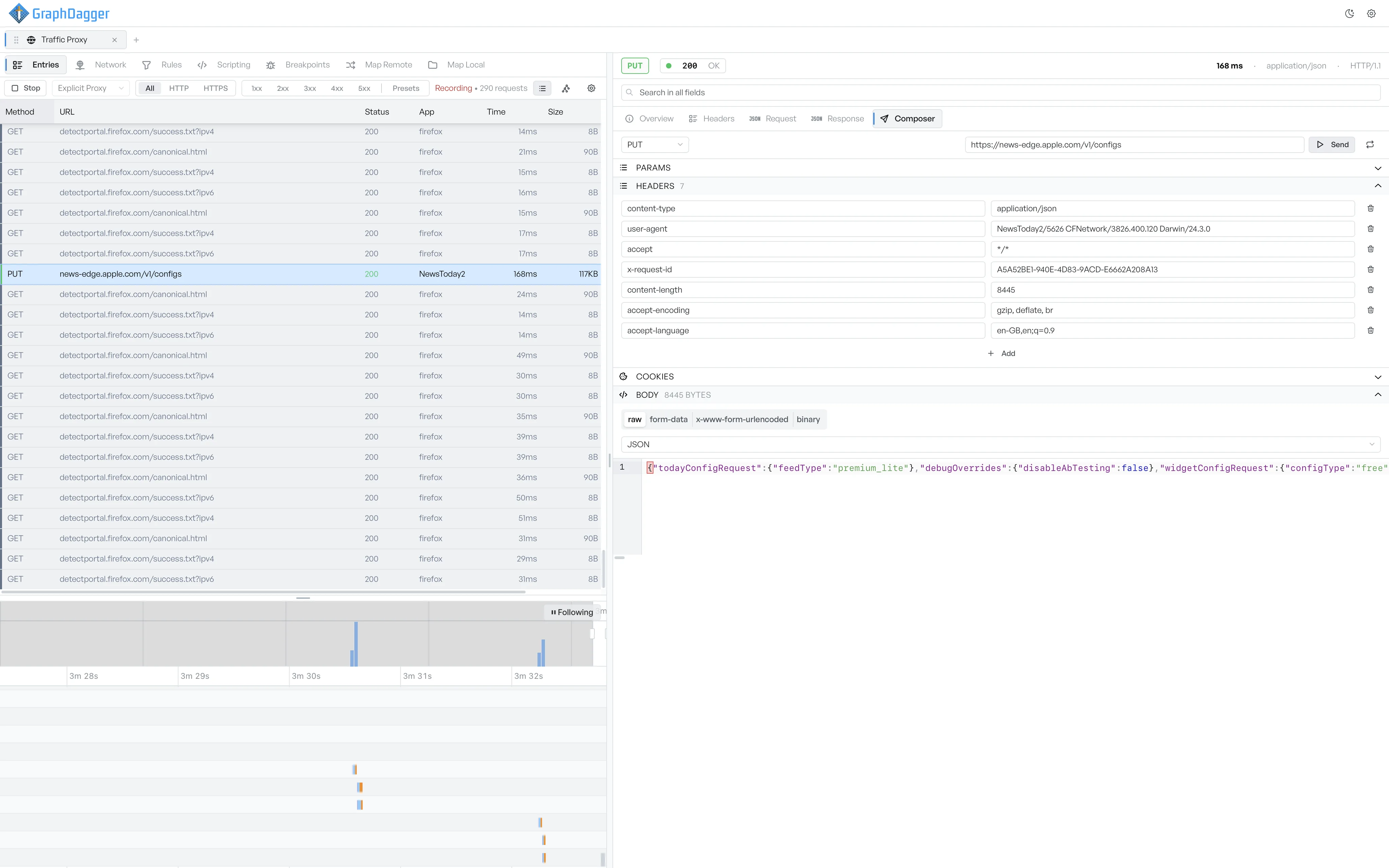
Explore the full tool: Web Debugger in GraphDagger
Fiddler exports captures as HAR alongside its native .saz format. Open it in the free HAR viewer, straight in your browser.
More than a Fiddler replacement
Fiddler shows you the traffic. GraphDagger keeps the rest of the investigation in the same window: the API you want to hit again, the token inside the Authorization header, the server logs that explain the 500.
- API Client with imports for Postman, OpenAPI, cURL and HAR
- Auth Inspector for JWTs, SAML and certificates, decoded locally
- Log Explorer to query the server side of the story
- Recorded traffic renders as a live call graph
- One licence, 14 tools, on both platforms your team actually uses
When to stay with Fiddler
Fiddler Classic remains free, and if your team is Windows-only with years of FiddlerScript automation, migrating that investment has a real cost. Deep .NET-specific integrations are its home turf. If that is your daily reality, keep it; GraphDagger earns its place the day someone on the team opens a MacBook.
How the licence compares
Fiddler Classic is free on Windows; its cross-platform successor is sold as a subscription per user. GraphDagger is also a subscription, but one licence covers the debugger and 13 other tools, on macOS and Windows alike.
Frequently asked questions
- Does GraphDagger have an AutoResponder equivalent?
- Yes. Map Local serves files from disk in place of live responses, Map Remote redirects requests to another host, and the match and replace rule engine handles URL, header and body rewrites for everything in between.
- What replaces FiddlerScript?
- A JavaScript scripting engine that runs against live traffic. Rules that needed JScript.NET in Fiddler become plain JavaScript, the language most teams already maintain.
- Does it run on macOS?
- Yes, natively. GraphDagger ships signed builds for macOS (Apple Silicon and Intel) and Windows (x64 and Arm64), and the Web Debugger behaves identically on both.
- Can I bring my archived Fiddler sessions?
- Export them as HAR and open them in GraphDagger. HAR import and export is built in; the proprietary SAZ format is not read directly.
- Is there a free trial?
- Yes, 14 days with every tool unlocked. Checkout starts the trial, nothing is charged while it runs, and cancelling before day 14 costs nothing.
Related comparisons
One debugger for the whole team
Start the 14-day free trial and run the same debugger on every machine, Windows and macOS alike. Nothing is charged during the trial.