Switch on active checks#
Passive checks read responses the crawl already collected, while active checks send crafted requests and stay locked until you confirm you are allowed to test the target.
Every check the crawler runs is either passive or active. The difference is whether the check sends traffic the target would not otherwise receive.
Passive checks read responses the crawl already collected. They add no requests and cannot break anything, so they always run and you cannot switch them off. Active checks send crafted requests that provoke a reaction, so they sit behind a confirmation that you are allowed to do that.
The four passive checks#
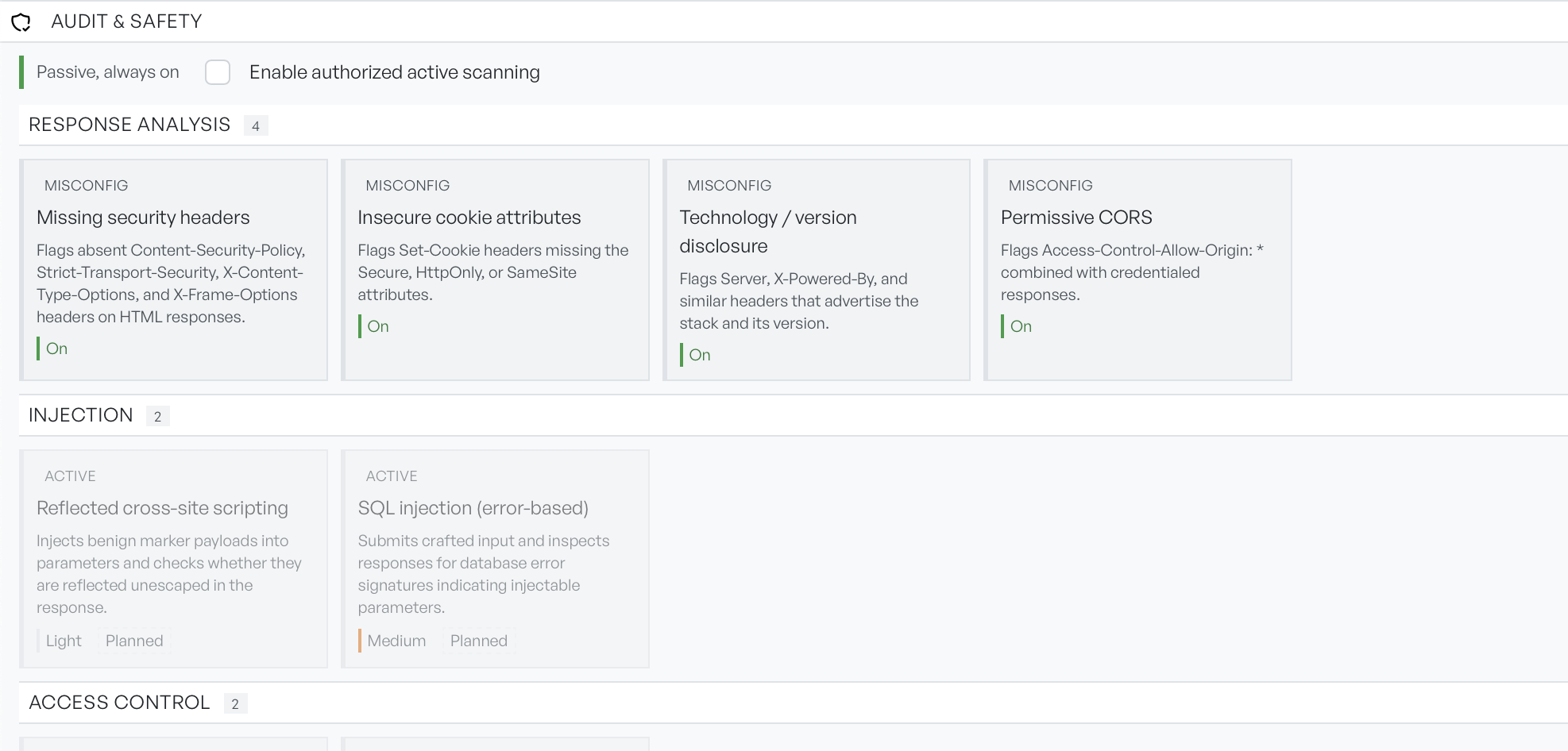
Four checks run on every crawl, grouped under Response analysis.
- Missing security headers: flags HTML responses without Content-Security-Policy, Strict-Transport-Security, X-Content-Type-Options, or X-Frame-Options.
- Insecure cookie attributes: flags
Set-Cookieheaders missing Secure, HttpOnly, or SameSite. - Technology / version disclosure: flags headers such as Server and X-Powered-By that advertise the software and its version.
- Permissive CORS: flags an
Access-Control-Allow-Originof*combined with credentialed responses.
These four cover the misconfigurations that appear in almost every assessment, and they cost nothing to run. On most crawls they are the entire result.
The planned active checks#
The remaining checks sit under Injection, Access control, and Exposure and SSRF. They cover reflected cross-site scripting, error-based SQL injection, broken object-level and function-level authorisation, mass assignment, and server-side request forgery.
Each of these checks is marked Planned. They ship in a later release.
Note Authorising active scanning today saves your selection and permits mutating requests during API scans. It does not yet run the six named checks above. A crawl with active scanning enabled will still report only the passive findings.
Authorise active scanning#
Tick Enable authorized active scanning to open a confirmation. It explains that active scanning may send POST, PUT, PATCH, and DELETE requests that create, modify, or delete data on the target. It asks you to confirm that you are authorised to test the target. The Authorize button stays disabled until you tick the confirmation, and a click outside the popover does not dismiss it.
Take the wording literally. Mutating requests against a live application change real data. If you untick the box afterwards, you revoke the authorisation, but you do not undo anything already sent.
After you authorise, GraphDagger selects every active check for you, and you can deselect them individually. An Intensity setting appears alongside. It caps how aggressive the selected checks may be.
- Light: sends few probes.
- Medium: balanced.
- Intrusive: the most thorough, and the highest impact.
What a flagged check produces#
Anything a check flags becomes a finding. Each finding carries a severity, a confidence, and the evidence behind it. Findings appear in the lower half of the results while the crawl runs. See findings and evidence.