Select the URL sources#
Links, forms, robots.txt, sitemap.xml and API definitions each feed the crawler new URLs, and JavaScript rendering is what makes a single-page application visible at all.
A crawler visits only the URLs it knows about. Discovery decides how it learns of them, and each toggle is a different source. Five of the six are on by default.
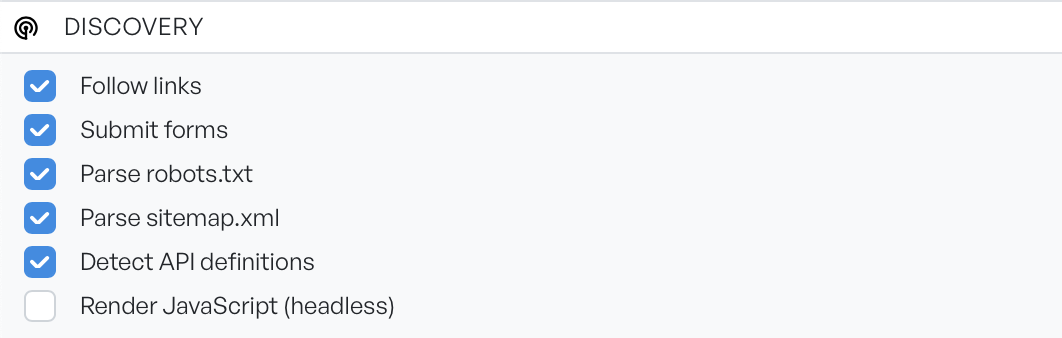
The five default sources#
Five toggles are on by default. Each one adds a different source of URLs.
- Follow links: reads anchors, stylesheet links, and frames out of each HTML response. It is the main engine of a crawl, and there is rarely a reason to turn it off.
- Submit forms: sends each discovered form with default values, to reach what lies behind it.
- Parse robots.txt: reads the file for the sitemaps it references. It affects discovery only. The separate Honor robots.txt setting in the scope panel decides whether the crawler obeys the file's restrictions.
- Parse sitemap.xml: seeds the crawl from the site's own declared URL list. It is the fastest route to broad coverage, and it often reaches pages that nothing links to. Watch for those locations in the results.
- Detect API definitions: flags the OpenAPI, Swagger, and GraphQL definitions the crawler comes across.
Submit forms is the most productive toggle, and the one to think about hardest. The crawler sends a POST form as a POST. On an application you do not own, that can create records, send messages, or trigger workflows. Turn it off for a crawl against production, or exclude the paths that matter in scope.
A detected definition is a good outcome. You can feed it straight into API scan, which covers the API directly rather than by inference.
Render JavaScript#
Render JavaScript is the only toggle that is off by default. With it off, the crawler reads the HTML as the server delivers it. Single-page applications deliver almost no HTML, so a crawl of one usually finds the entry page and nothing else.
Turn it on, and the crawler runs each page in a headless browser first. Content that scripts build then becomes visible. This is what makes a modern application crawlable at all.
The costs are real. Every page is slower by an order of magnitude, and memory use rises sharply. The option also needs a browser engine on the machine. Leave it off unless a crawl comes back nearly empty against a site you know has more to it.
Select sources by site type#
Against a static or server-rendered site, the defaults are correct.
Against a single-page application, turn on Render JavaScript and expect a slower crawl.
Against anything in production you do not own, turn off Submit forms first, before you touch anything else.