Read the TLS certificate#
The served certificate names its subject, its issuer and its validity window, and the alternative names it also covers often expose hosts you did not know were there.
The SSL/TLS Forensics section fetches the certificate the domain serves. It then breaks the certificate into the parts that matter: who it says it is for, who issued it, how long it is good for, and every other name it also covers.
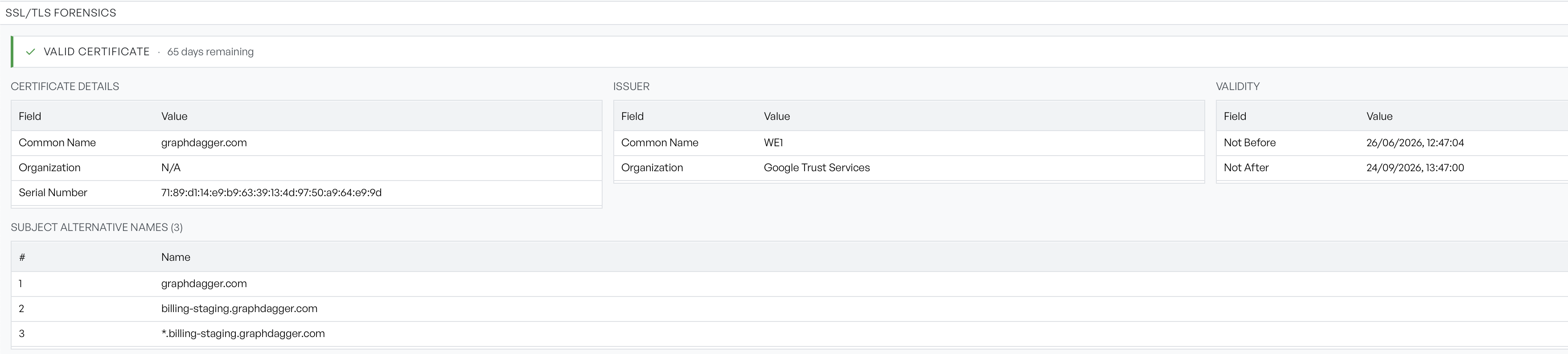
The validity banner#
A banner across the top gives the verdict: Valid certificate or Invalid or expired, followed by the number of days remaining.
The remaining-days figure changes to a warning style once it drops below 30. That threshold is a prompt to check renewal, not a statement that anything is broken.
Subject, issuer and validity#
Three panels break the certificate out:
- Certificate Details: covers the subject, its common name, organisation, and serial number.
- Issuer: names the certificate authority that signed it.
- Validity: gives the not-before and not-after dates in your local format.
Any field the certificate does not carry shows as N/A. That is common in Organization for domain-validated certificates. Those certificates prove control of a name, and they assert nothing about the organisation behind it.
Subject alternative names#
Read the list underneath closely. The heading carries the count, and each row is a name the certificate is also valid for.
This is often the most productive part of a reconnaissance run. A certificate issued for a public site frequently lists internal, staging, or administrative hostnames alongside it, and a wildcard entry tells you that a whole subdomain tree exists. Enter the names you find here in the target field, or in the Port Scanner.
When no certificate is shown#
If the section stays empty, Network Recon could not retrieve the certificate. That usually means nothing is listening for TLS on the domain, the handshake failed, or the name does not resolve at all. Check the connectivity section to tell those apart.
The filter box applies here too. When a filter matches nothing in this section it reads No matching SSL details.