Read the container structure#
The tab walks the file itself, reporting the declared format, the chunk layout, embedded tags, and any structural oddity it meets on the way.
A file that sounds ordinary can still be structurally wrong: a chunk that overruns its declared length, a tag left behind by an editing tool, padding where no padding belongs. The Metadata tab reads the container rather than the audio. It runs on its own the moment you open a file. Look here first, before you spend time on the signal.
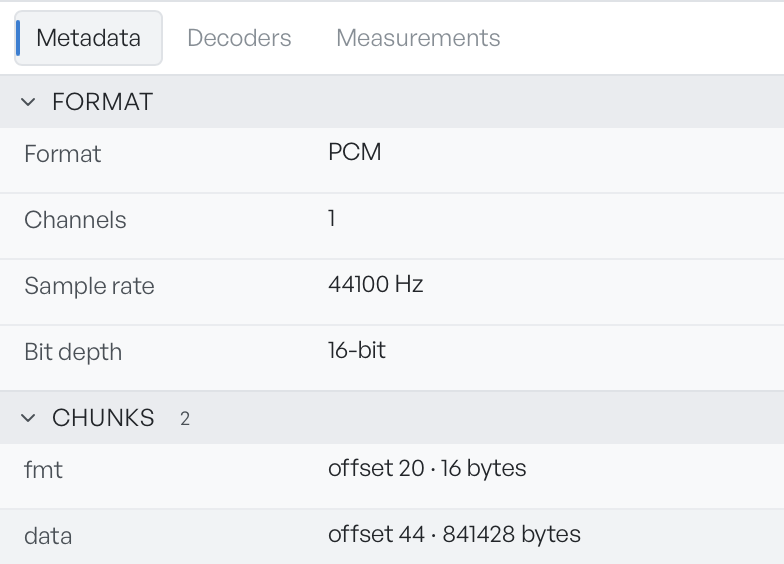
Anomalies, Format, Chunks, and tags#
Anomalies appears first, and only when there is something to report. Each entry describes one structural oddity the app found as it walked the container. Treat it as the headline of the tab: if this section is present, read it before anything else.
Format reports what the container claims about itself: the sample format, the channel count, the sample rate, and the bit depth. Compare it against the status bar at the bottom of the workspace, which reports what the decoder produced. Chase any disagreement between the two.
Chunks lists the container structure in order, each with its byte offset and size. A well-formed WAV file is mostly fmt followed by data. Anything extra is a lead. A chunk you do not recognise, or one far larger than its contents justify, is a good place to look for hidden bytes.
Metadata tags lists embedded text tags, and appears only when the file carries any. Authoring tools, recorders, and editing suites all leave traces here.
Follow a suspicious chunk#
If the chunk layout suggests bytes hide somewhere, the Measurements tab lists every printable string in the container, and LSB extract pulls payloads out of the sample data itself.