Set variables and scopes#
Environment, collection, and global scopes resolve in order, and the closest one wins.
A variable is a name that stands in for a value. Write {{baseUrl}} in a URL or {{token}} in a header, and API Client fills in the real value when you send. Variables live at a few levels, from globals that apply everywhere down to a single collection. The closest one wins.
Globals and environments#
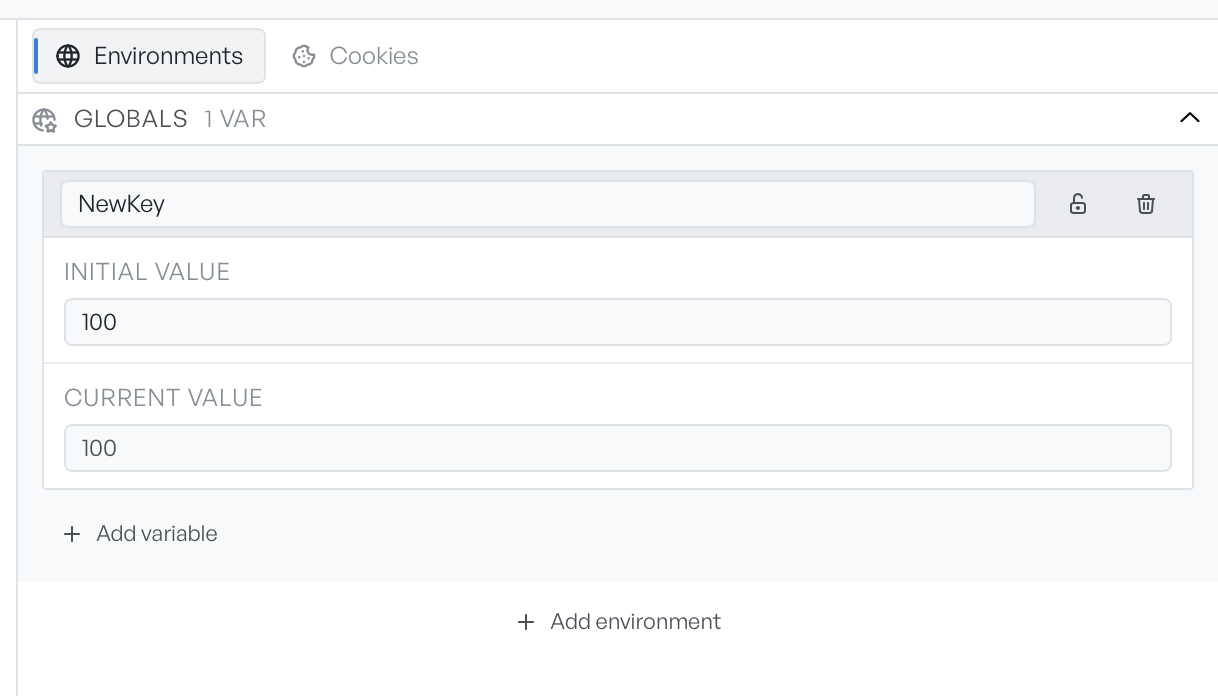
The Environments tab has a Globals section and one section per named environment. Globals apply no matter which environment is active. An environment's variables apply only while that environment is the active one.
Four controls act on these sections:
- Add variable: adds a variable to the section.
- Add environment: adds a named environment.
- Lock icon: marks a variable as secret and masks its values in the panel.
- Bin icon: deletes the variable.
Initial value and current value#
Each variable has an Initial value and a Current value, and this split is the useful part.
- Initial value is the value you set by hand. It is the stable starting point.
- Current value is what API Client actually uses. When a script writes to a variable, for example to save a token from a login response, it writes the current value. If the current value is empty, API Client uses the initial value instead.
So the initial value is your default, and the current value is the live value that requests and scripts read and write. Clear the current value to fall back to the initial one.
How a reference resolves#
Write a reference as {{variableName}}. When you send a request, API Client looks up each reference in order, and the first match wins:
- Environment (the active one)
- Collection
- Global
The active environment beats the collection, and the collection beats globals. So a baseUrl set on an environment overrides one set globally. API Client also resolves a reference that points inside another reference, up to one level of nesting. Anything it cannot resolve stays in place as literal {{...}} text, which makes an unset variable easy to spot in the sent request.
References work in the URL, query parameters, headers, body, form fields, and the Auth tab.
Secret variables#
A secret variable masks both of its values in the panel behind dots. It stays usable in requests exactly as before. Secrets matter most when a collection is linked to a folder on disk: API Client keeps secret values out of the shared files and stores them only on your machine.
For values that should be different on every request, such as a fresh timestamp or a random id, see Dynamic variables.