Decode a credential#
Paste an opaque string, let the protocol detection pick a reader, then work through the decoded sections and check a JWT signature yourself.
Decode is the core of Auth Inspector: you give it an opaque string, and it gives you back the structure inside. You do not have to tell it what you pasted. It reads the text, decides which of the five protocols it is looking at, and picks the matching reader.
Paste a credential#
Paste into the input bar. It accepts a JWT, SAML response, OAuth token, X.509 certificate, or Kerberos ticket.
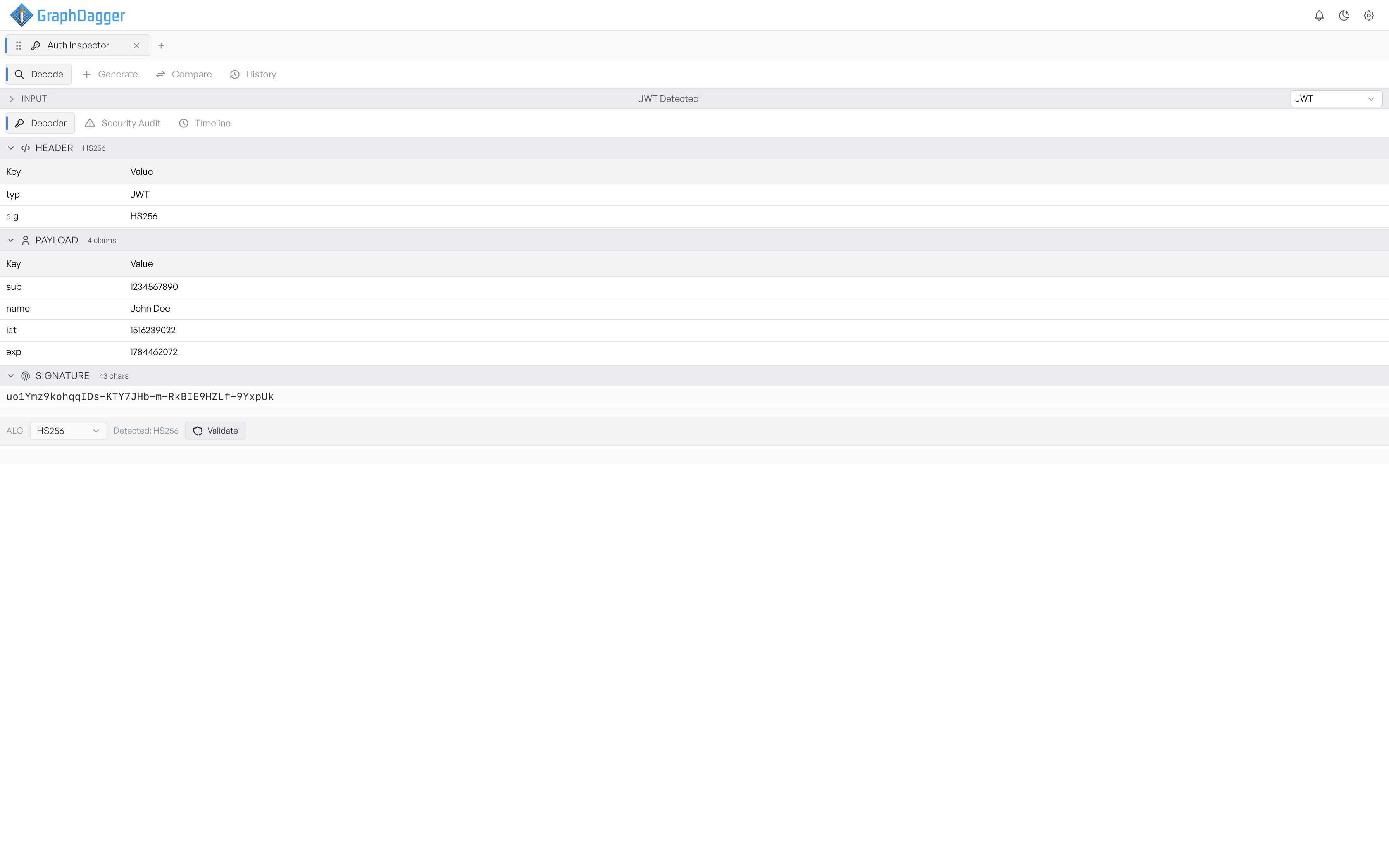
Auth Inspector detects the protocol as you type, not on a button press. The moment the text looks like something it recognises, the label in the bar names it, for example 'JWT Detected' or 'X.509 Detected'. A dropdown shows the same choice.
Set the protocol yourself#
Detection works on shape. A PEM header marks a certificate, three dot-separated segments mark a JWT, SAML markers in the text or inside a Base64 payload mark an assertion, and a URL carrying response_type or client_id marks an OAuth request.
If none of those match, Auth Inspector keeps whichever protocol is already selected and decodes with that. The status label still names that protocol, so check the dropdown when a result looks wrong. When you choose a protocol yourself, Auth Inspector re-reads the input at once with the reader you picked.
Note Opaque tokens, such as a random access-token string from an authorisation server, have no structure to detect. Set the type to OAuth / OIDC and Auth Inspector reports its length, entropy, and character set rather than pretending to decode it.
Read the decoded sections#
The Decoder tab presents the credential as collapsible sections. Each section has a heading for the part it covers and a badge that summarises it at a glance.
The sections follow the protocol:
- JWT: Header, badged with the algorithm. Payload, badged with the claim count. Signature, badged with its length.
- SAML: assertion details, conditions, attributes, signature information, and the raw XML.
- X.509: an overview, the subject and issuer distinguished names, subject alternative names, key usage, public key details, and the fingerprint.
- Kerberos: the ticket overview, a hex view of the raw ticket, and any ticket flags with a plain-English description of each.
OAuth is the one case where the shape varies enough that you may need to help. Use the Type selector on the Decoder tab to choose between Access Token, ID Token, Auth URL, Discovery Doc, and JWKS.
Check a JWT signature#
A decode does not verify a JWT. The payload needs only Base64 to read, so a token can decode perfectly and still be forged.
The Signature section carries its own validator. Choose the algorithm you expect from the Alg dropdown, which lists the detected one beside it. Enter the secret for an HMAC algorithm, or the public key for an asymmetric one. Then select Validate. The result reports Signature Valid or Signature Invalid along with the algorithm used.
If you validate against the algorithm the token itself claims, the check proves nothing. If a token arrives claiming none or an unexpected algorithm, the security audit flags it.