Export to a pcap file#
Write every frame, or a chosen range of packet IDs, back out as raw bytes other network tools can read.
You can save a capture back out to a standard .pcap file that other network tools can read. The export writes the original frame bytes, not the decoded view, so nothing the workspace inferred goes into the exported file.
Export every frame#
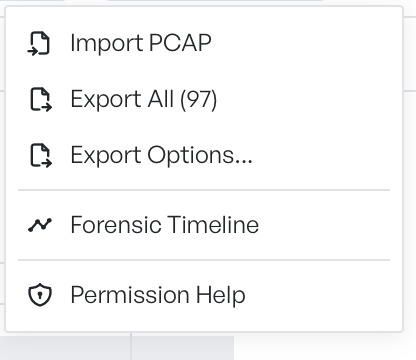
The cog menu has two export entries:
- Export All (n): writes every frame in the workspace, where
nis the current packet count. - Export Options: opens a dialog where you select a range first.
When you select Export All, a save dialog opens. Select a folder and a filename. The default filename is capture.pcap. The workspace then writes the file immediately.
The cog icon shows a loader during the export. The menu entries stay disabled while the workspace is empty.
Export Options#
The Export Options dialog writes a subset of the capture instead of the whole capture.
Screenshot to be added: the Export to PCAP dialog with the Packet Range mode selected, a Start ID and End ID filled in, and the footer line reading 'Exporting n of total packets'.
The dialog has these controls:
- Export Mode: All Packets or Packet Range. All Packets behaves the same as Export All.
- Start ID and End ID: the first and last packet IDs to include. The dialog shows them only when you select Packet Range. Both bounds are inclusive.
- Footer count: a running total of how many packets the current selection exports.
- Export: writes the file with the same save dialog as Export All.
The packet IDs match the No. column in the packet list. To select a range visually, find the first and last frame in the list, read their IDs, and type them into the dialog.
What the file contains#
The exported file contains the raw frame bytes, exactly as the workspace captured or imported them. None of the workspace's overlays survive the round trip:
- The file does not store stream IDs. When you open the file again, the workspace recomputes them.
- The file does not store application-layer parses. When you open the file again, the workspace decodes them again.
- Filters and searches do not affect the file. Use Export Options if you want to restrict the file to a range.
- The file does not store the comments and colours you add to rows.
Reopen the file with Import PCAP to rebuild the same workspace from the bytes.