Find an element locator#
Point at an element in the DOM snapshot to read its suggested Playwright locator, its attributes, and its markup.
In DOM mode the preview holds the real structure of the page, not a picture. You can point at any element and get a suggested Playwright locator for it, with its attributes and markup. It is the quickest way to work out how to target something you can see in the trace.
Pick an element in DOM mode#
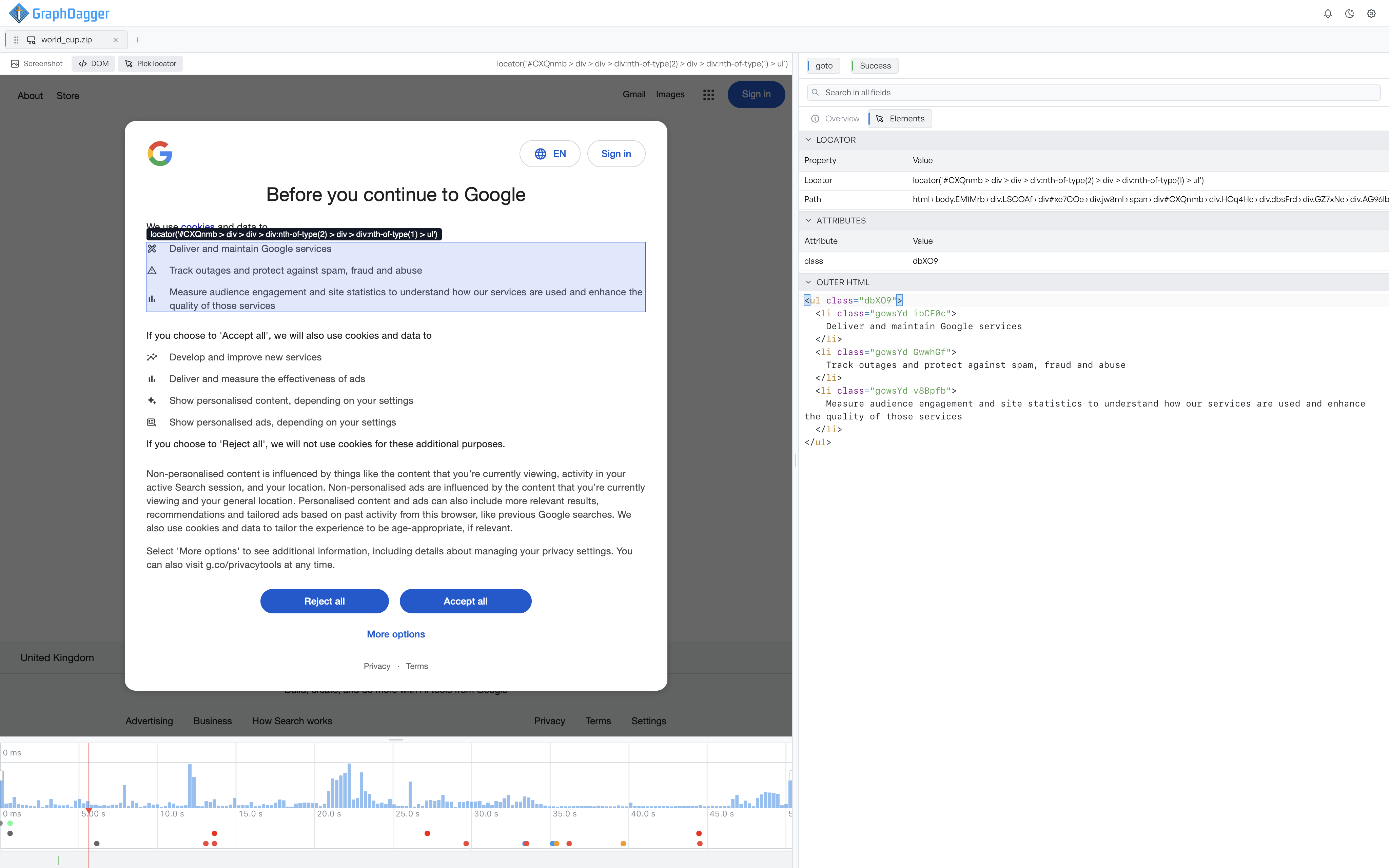
Switch the preview to DOM, then select Pick locator. As you move over the snapshot, the preview outlines the element under the cursor and shows its suggested locator. Select an element to lock it in.
Read the Elements tab#
The element you select opens on the Elements tab of the inspector, which shows:
- Locator: a suggested Playwright locator for the element, plus its path down the page. The locator prefers a stable target where it finds one, such as a test id, a role and name, a label, a placeholder, or visible text. It falls back to an id or a structural path.
- Attributes: the element's attributes and their values.
- Outer HTML: the element's markup, formatted for reading.
The locator is a starting point you can copy into a test. It is not a guarantee that the locator is unique on the live page.