Edit a paused request#
Change the method, URL, parameters, headers, cookies, or body of the held request, then forward it or drop it.
A live request pauses on the wire when it matches an enabled breakpoint. It then appears under the breakpoint in the sidebar. Select the paused request to open the editor in the right pane.
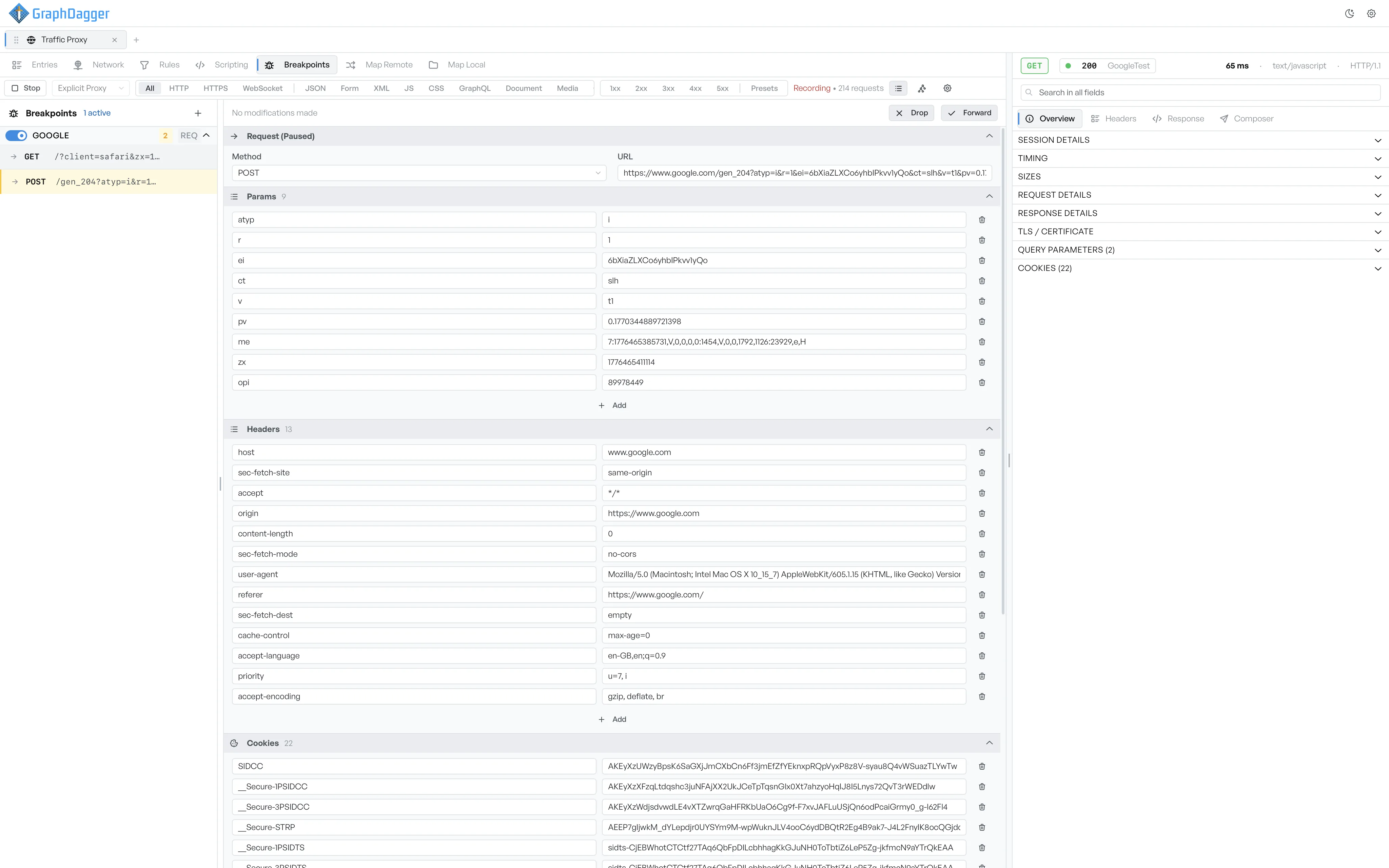
Edit the held request#
The editor opens with the request in a row of collapsible sections.
- Request line: the method dropdown and the URL.
- Params: the query parameters as editable rows. Edit a value, delete a row with the trash icon, or add a new row from the empty row at the bottom.
- Headers: the request headers, with the same editing model.
- Cookies: the request cookies, with the same editing model.
- Body: a body-type selector (raw, form-data, x-www-form-urlencoded, binary) and the body editor underneath.
When the pause point is After Response, the same view changes to response mode. You can then edit the status, the status text, the response headers, and the response body before the client receives them.
What the status line says#
A small status line at the top of the editor shows No modifications made until you edit something. After a change, it shows Request has been modified. The Forward button also changes its label to Forward Modified, so the difference between the original and your changes is clear.
Forward or drop the request#
Two buttons sit at the top of the editor.
- Drop: discards the request. The client sees a failure, and nothing reaches the server. On the response side, GraphDagger drops the response before it reaches the client.
- Forward (or Forward Modified): sends the current content of the editor. If you changed anything, your changes go out instead of the original.
The breakpoint sidebar also offers a quick-action pair on each paused row: ✓ to forward the request as-is, and × to drop it. These actions do not open the editor.
Stop with requests still paused#
If you select Stop in the recording toolbar while requests are still paused, GraphDagger asks you to act on them first, so no traffic leaks through unmodified. Drop or forward each pending request, then select Stop again.