Read the scanned endpoints#
Each row is one operation from the definition, and its status code tells you whether the running service still matches what the document claims.
An API scan fills the same results area as a crawl, and reads the same way. The difference is what a location means. Every row is one endpoint from the definition, not a page the crawler found by following links.

The endpoint rows#
Four columns read differently from a crawl.
- Kind: reads
api-endpointon every row. - Found by: reads
api-scan, because these rows came from the definition rather than from a crawl. - Depth: 0 throughout, for the same reason. The scan navigated to nothing.
- URL: carries the method as well as the address, so
GETandPOSTagainst the same path are separate rows.
Read the Status column first. A definition describes what an API is supposed to offer, and the scan reports what it actually did.
- 404: the endpoint is described but not deployed. This usually means the definition has drifted from the running service.
- 401 or 403: the endpoint exists and is protected.
- 200 on something you expected to be protected: the finding you are hoping to catch.
The endpoint graph#
The graph draws each endpoint as a card with a green API band, the same encoding used across the site map.
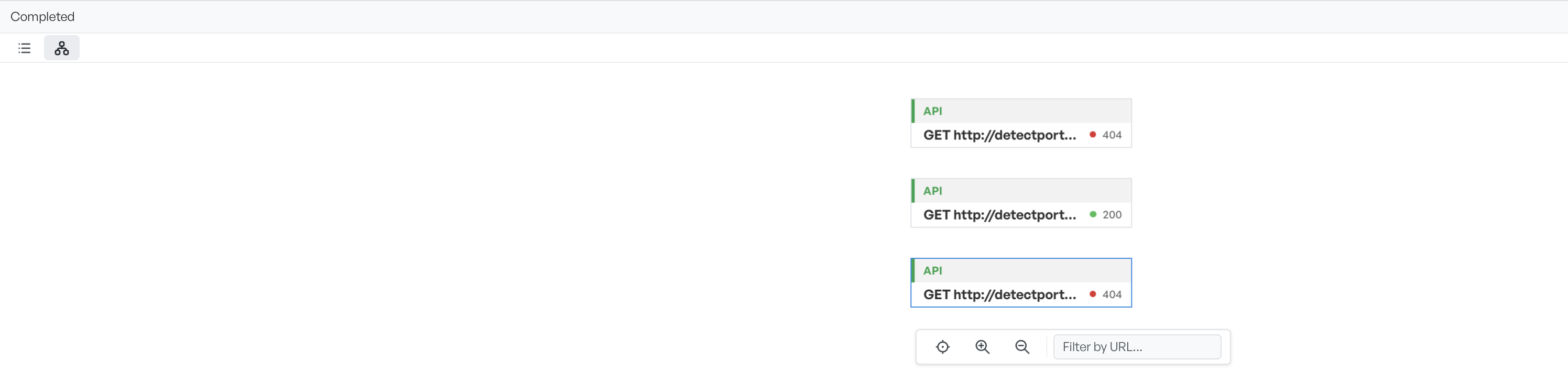
The graph arranges endpoints by URL path nesting, so a large API groups by its resource structure. The filter box narrows by URL. Use it to work through a definition that covers hundreds of operations.
Findings from an API scan#
Findings appear below in severity order, and the detail pane behaves exactly as it does for a crawl. Select an endpoint to see its request and response. Select a finding to highlight the header or value that triggered it.
A scan with no findings is a normal outcome, and the pane reads No findings. The passive checks look for missing security headers, insecure cookies, version disclosure, and permissive CORS, and an API that sets none of those wrongly produces nothing. The location list is still the result: it tells you which endpoints exist and what they returned.
When too few endpoints appear#
A definition may list many endpoints while the scan produces few locations. The parse selection was usually narrower than you thought. Check the endpoint list and the method filter on the definition tab.
Endpoints that all return 404 point at the base URL rather than the endpoints. The definition's declared server is often a production host. That host may be unreachable from the machine that runs the scan, or it may not be the environment you meant to test.