Set a row colour#
Tint one row, or a whole selection at once, from the preset palette, and clear the tint again when you are done.
A colour tints a whole row so it is easy to find again. Use it to group related moments, flag the steps that failed, or mark the parts of a run you want to talk through.
Set or clear a colour#
Right-click a row and select Set Color. Then select a colour from the palette: Red, Orange, Yellow, Green, Blue, Purple, or Pink. The row takes a light tint, and its left edge takes the colour. To remove the colour, select Set Color, then Clear Color.
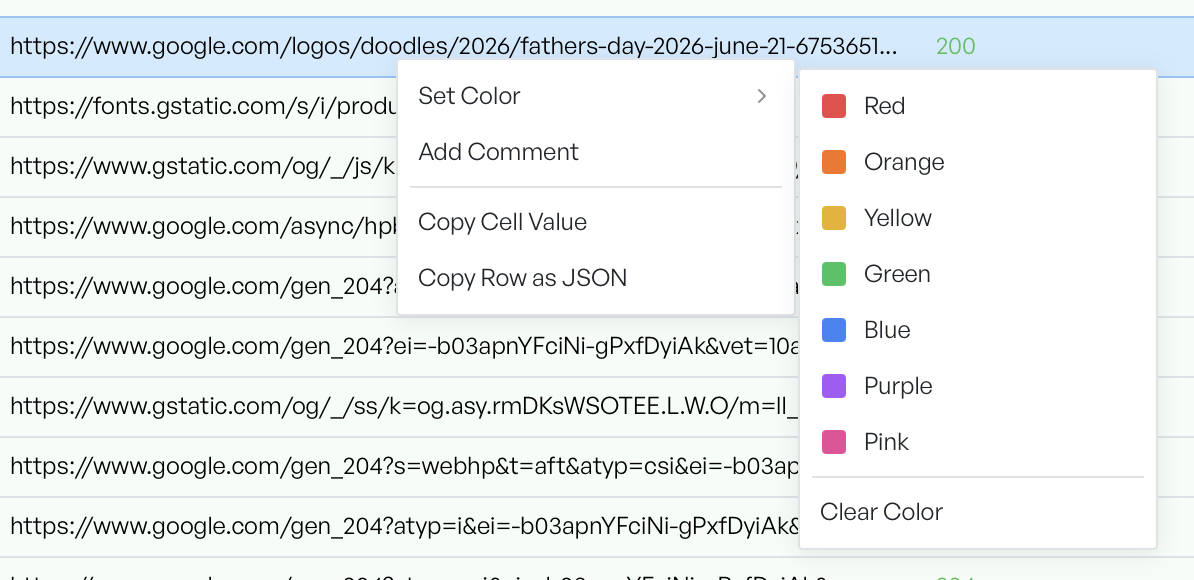
Colour many rows at once#
To colour a group in one go, select the rows first. Then right-click and set the colour. The menu shows how many rows it changes, for example Set Color (3), and applies your choice to all of them. You clear a colour the same way across the selection.