Set a Schedule trigger#
Arm a flow to run itself on a fixed interval, and read the status line that tells you the timer is live.
A scheduled flow runs itself on a fixed interval for as long as the app is open. Use it for work that should keep happening without you: a feed you re-fetch every ten minutes, a list of indicators you re-check every hour, or a report you rebuild on a timer.
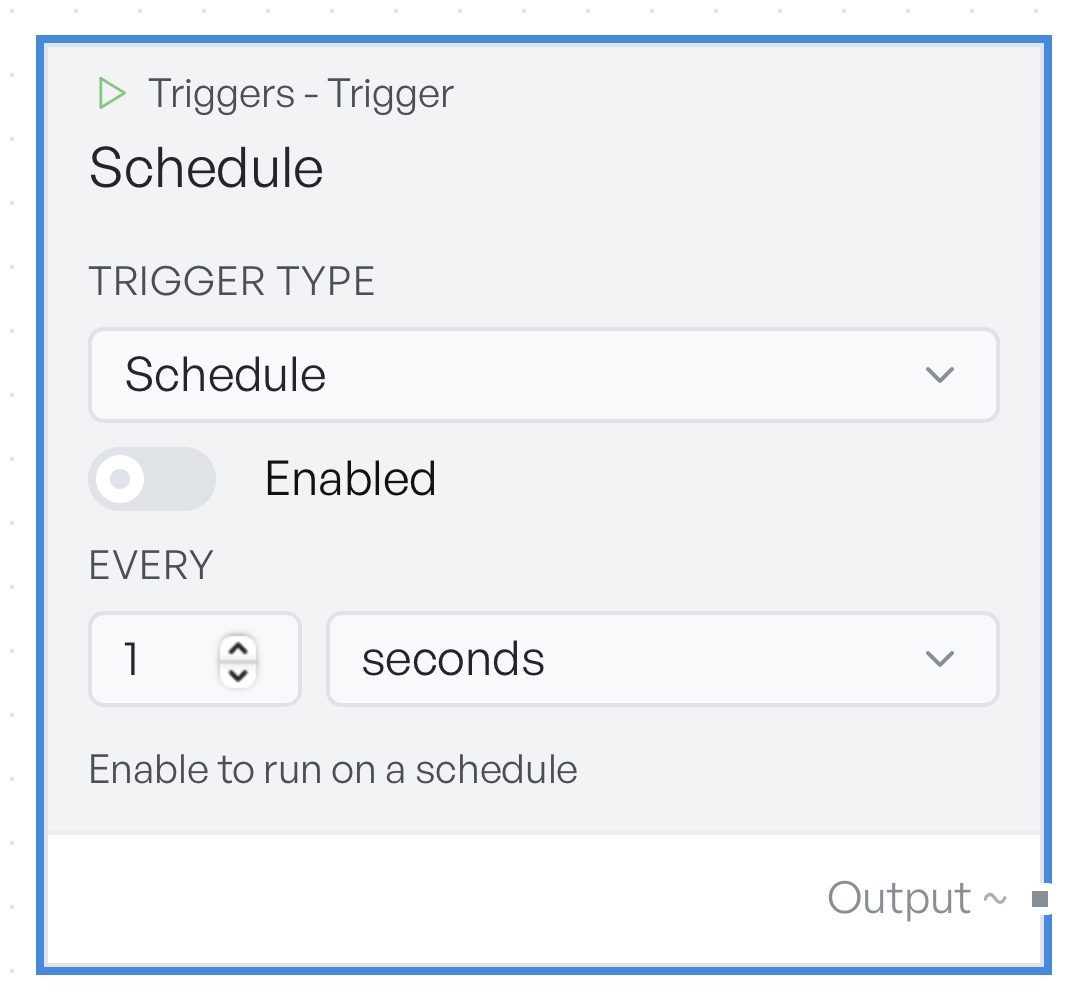
Set the trigger type to Schedule. The block gains three controls.
Set the interval and arm it#
Enabled is a toggle, and it starts off. Nothing is scheduled until you turn it on, so you can build and test the flow first, and arm it when you are happy with it.
Every takes a number, and the dropdown beside it takes the unit: seconds, minutes, or hours. The default is every 5 minutes.
Underneath, a line of text tells you the current state. When the schedule is armed it reads Runs every 5 minutes while the app is open, with your own numbers in it. When it is not armed, it reads Enable to run on a schedule. Read that line as your confirmation, because it is the only place the app tells you the schedule is live.
The shortest interval the app honours is one second. Enter something faster and the app raises it to one second.
Note An interval of zero or a negative number disables the schedule silently, with no error. If a scheduled flow never seems to run, check the interval is above zero and the status line reads 'Runs every ...'.
When a tick is skipped#
If the flow is still running when the next tick comes round, the app drops that tick rather than queues it. The following tick runs as normal.
This matters when a flow takes longer than its interval. A flow set to run every 5 seconds that reliably takes 8 seconds runs every 10 seconds in practice, and it does not pile up runs behind itself. The app reports nothing when it skips a tick, so if the run count looks low, compare how long a run takes against the interval you set.
What a scheduled run passes in#
A scheduled run passes in the time it fired, as an ISO 8601 timestamp. That is the whole input. A flow that needs data of its own must fetch it in a downstream block, rather than expect it from the trigger.
The same is true when you click Run flow on a scheduled flow: you get the current time. That is the quickest way to test the flow without a wait for a tick.
Which window a schedule runs in#
Schedules run in the main window only. A flow in a popout window does not fire on its timer, though you can still run it by hand.
When you close the app, every schedule stops. The app catches nothing up when you reopen it. The flow starts to run on its interval again from that point.