Rename and remove items#
Every row carries a three-dot menu, and what it offers depends on the kind of node.
Every row in the Collections tree carries a three-dot menu for acting on it. Hover over a collection, folder, request, or flow, then click the button that appears at the right of the row. The menu changes with the kind of node, so a collection offers more than a single request does.
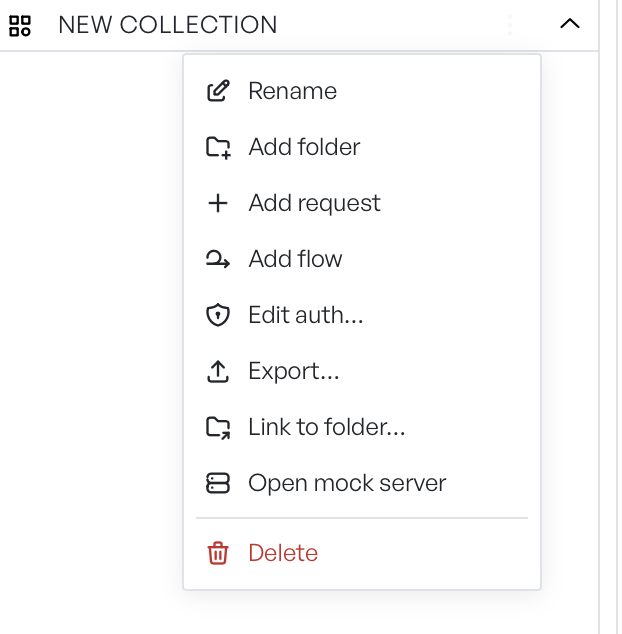
Menu on a collection#
A collection has the fullest menu.
| Action | What it does |
|---|---|
| Rename | Opens a popover with the current name. Edit it and click Rename. |
| Add folder | Opens a popover and adds the folder to this collection. |
| Add request | Opens a popover for a name, then adds a new request and opens it in a tab. |
| Add flow | Opens a popover for a name, then adds a new flow and opens it in a flow tab. |
| Edit auth | Sets the auth this collection passes down to its contents. |
| Export | Saves the collection to a file. |
| Link to folder | Mirrors the collection to a folder on disk. Reads Unlink folder while linked. |
| Open mock server | Opens a mock server tab for this collection. |
| Delete | Confirms, then removes the collection and everything in it. |
Edit auth feeds the auth inheritance that requests below it can pick up. Export produces a file you can share or re-import; see Exporting. For Link to folder, see Linking to a folder. For Open mock server, see the Mock server overview.
Menu on a folder#
A folder offers Rename, Add folder, Add request, Edit auth, and Delete. They behave as they do on a collection, but they apply only to the folder. Edit auth sets what the folder passes down to the requests inside it.
Menu on a request or flow#
A request or flow offers Rename and Delete. Rename on an open request also updates its tab name. Rename on a flow updates the tab name and the name on the canvas. Delete removes the item and closes its tab if it is open. Delete on a flow also discards the running copy.
Deletes are confirmed but final#
Every Delete opens a confirmation that names the item. There is no undo. Once you confirm, the item is gone.