Send a GraphQL query#
Write against the schema with autocomplete, and catch the errors a 200 hides.
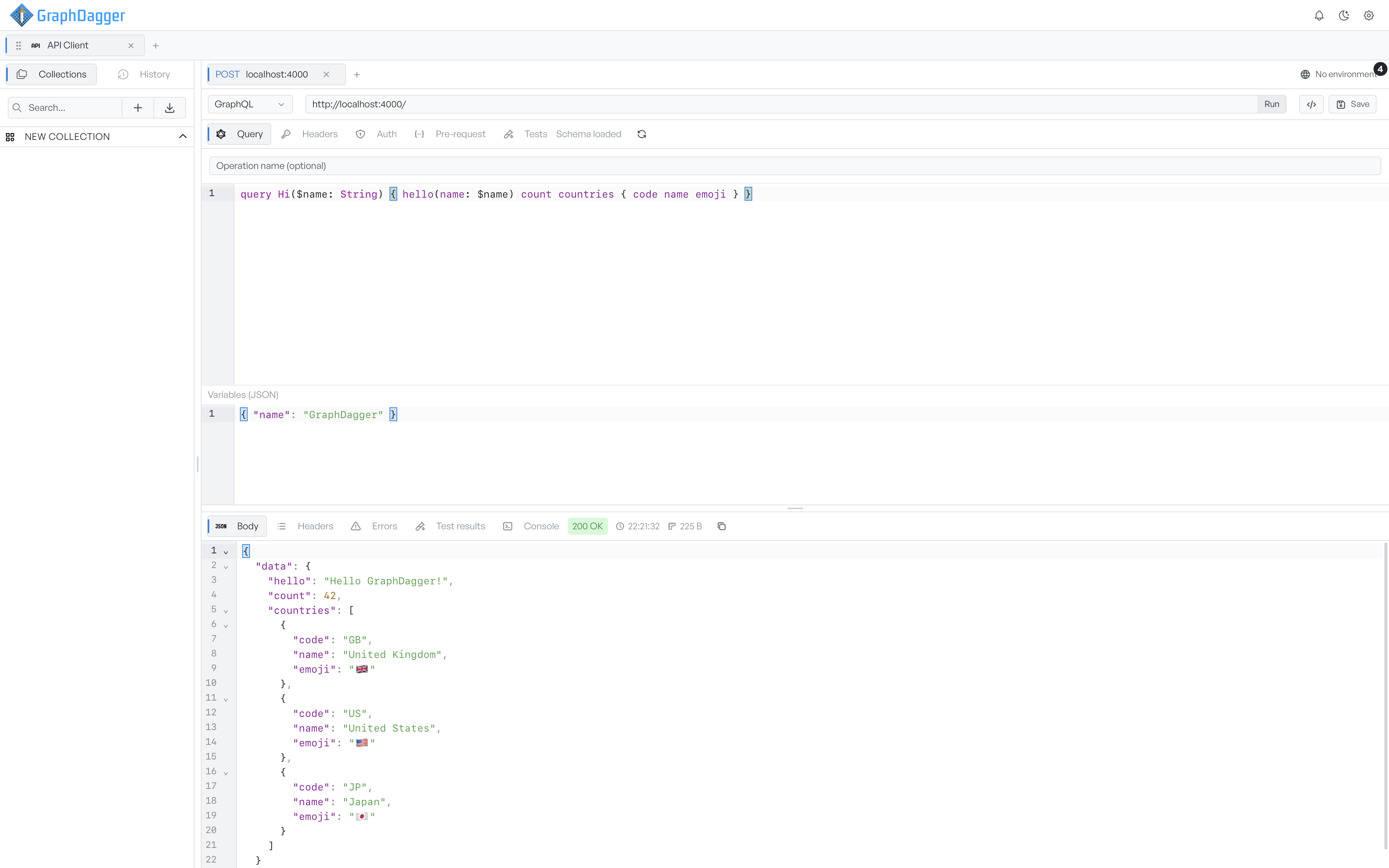
Set the request type to GraphQL when you want to write a query against a schema rather than hand-build a JSON body. The tab gives you a query editor with schema-aware autocomplete and a separate box for variables. The response panel also reports GraphQL errors, even when the status code says the request was fine.
Write a query#
Enter the endpoint in the URL bar and click Run. GraphDagger always sends a GraphQL request as a POST, so it sets the method for you.
The request panel has a Query tab with three parts:
- Operation name (optional). Fill this in when a document defines more than one operation and you want to run a named one.
- The query editor. Write your query or mutation here. When the schema has loaded, autocomplete suggests fields and arguments as you type.
- Variables (JSON). Supply query variables as a JSON object, for example
{ "name": "GraphDagger" }. While the JSON is invalid, the label changes to warn you. GraphDagger holds the variables back until they parse, so it never sends a half-typed object.
Click Run, or press Enter in the URL bar, to send the query.
Load the schema#
GraphDagger reads the endpoint's schema by introspection. It uses the same auth and headers as your request. The status shows next to the request tabs: Loading schema…, then Schema loaded once the schema is ready, or Schema unavailable when GraphDagger cannot introspect the endpoint. Click the refresh button to re-read the schema after the API changes.
Autocomplete improves once the schema loads, but the schema is never required. You can send a query to an endpoint that GraphDagger cannot introspect.
Find GraphQL errors behind a 200#
The response panel has its own tabs:
- Body. The JSON response, formatted.
- Headers. The response headers.
- Test results and Console. Present because GraphQL supports scripts. Test results shows a pass count after a test runs. Console lights up when a script logs something. See Tests.
A GraphQL server usually answers with 200 even when a field fails. The status code is therefore not an honest signal of whether the query worked. When the response carries GraphQL errors, a notification tells you how many there are. It lists each error with its message and, where present, its path, location, and code. Check the notification when the Body has a null field but the request still returned 200.