What each request type does#
One tab speaks HTTP, GraphQL, WebSocket, SSE, and gRPC, and reshapes to fit.
API Client is not only an HTTP tool. The same tab speaks five request types, and you select the type in the URL bar. The request panel, the action button, and the output area all change to fit the type you pick. A WebSocket tab then behaves like a socket console, and a gRPC tab behaves like an RPC client, without leaving the workspace.
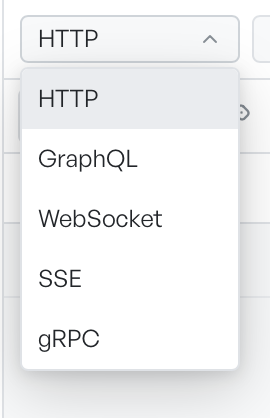
Select a request type#
The request type dropdown offers HTTP, GraphQL, WebSocket, SSE, and gRPC. When you switch the type, the tab changes shape. The request tabs, the button you click to run the request, and the panel that shows the result are all specific to the type.
HTTP is the default, and the rest of this feature's pages cover it. This page describes the other four.
The five types compared#
| Request type | What it is | You press | What you get back |
|---|---|---|---|
| HTTP | A single request and response | Send | A response with body, headers, and status |
| GraphQL | A query or mutation against a schema | Run | A JSON response, with GraphQL errors flagged for you |
| WebSocket | A two-way, long-lived connection | Connect | A running log of frames sent and received |
| Server-sent events | A one-way stream from the server | Subscribe | A running log of events as they arrive |
| gRPC | A typed remote procedure call | Run | The reply message, or a stream of messages |
What carries across the types#
Some parts of a request behave the same whichever type you pick, and some do not.
- Variables.
{{variable}}and dynamic values resolve in the URL, headers, and body for every type. See Environments and variables. - Headers. Every type sends headers. gRPC calls them metadata, which is the same idea on the wire.
- Authentication. The Auth tab is available for HTTP, GraphQL, server-sent events, and gRPC. WebSocket carries credentials through its headers instead.
- Scripts. Pre-request scripts and tests run for HTTP and GraphQL only.
Live connections are session-only#
GraphDagger holds WebSocket frames, server-sent events, and gRPC stream messages for the current session only. Each log keeps the most recent 500 entries and drops the oldest beyond that. When you close the tab or the app, the logs clear. When you save the request to a collection, GraphDagger saves its setup, not its past frames or events.