Write a filter expression#
Build clauses with wildcards, unions, ranges, negation, and existence tests, then join them with AND or OR.
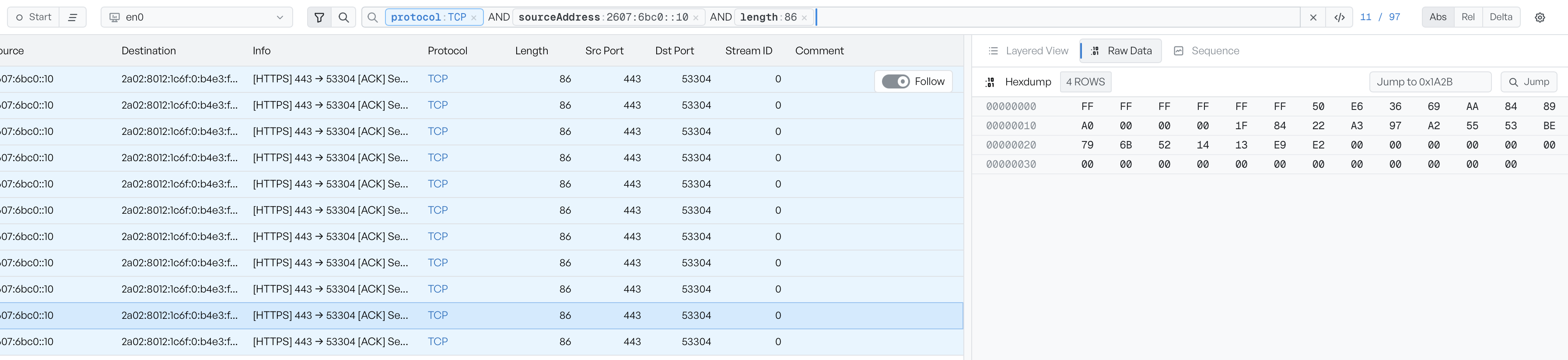
The filter bar accepts a small expression language built around field:value clauses joined by AND or OR. The bar renders completed clauses as coloured pills, so the structure of a long filter stays visible at a glance.
Write a clause#
A clause has the form field:value. The colon is required:
protocol:TCP
sourceAddress:192.168.178.62
length:>1400
The right-hand side is the value for equality matches, or a comparison for numeric fields (>, <, >=, <=).
When you commit a clause with Enter, the bar replaces the typed text with a pill. The bar tints the pill by protocol where the field implies one, so a protocol:TCP pill sits in a different colour from a protocol:DNS pill. Select a pill to edit that clause in place. Press Enter to commit it back to its pill form.
Match with wildcards#
field:* matches any value, as long as the field is present:
tcpFlags:*
This is equivalent to has:tcpFlags. Use whichever reads better in your filter. A ? stands in for a single character, and a * inside a value matches any run of characters, so hostSni:*.example.com matches any subdomain.
Match several values#
field:(a OR b) matches frames where the field equals any of the listed values:
protocol:(TCP OR UDP)
dstPort:(80 OR 443 OR 8080)
OR joins the values inside the parentheses. The clause as a whole still combines with the rest of the filter through AND or OR.
Match a numeric range#
For numeric fields, a range clause matches values between two bounds. Square brackets include the bounds. Braces exclude them:
length:[500 TO 1500]
srcPort:{1024 TO 65535}
Use a * for one side to leave it open, so length:[1400 TO *] matches every frame of at least 1400 bytes.
Exclude with a minus#
A leading minus negates a clause. The bar reads -field:value as 'frames where the field is not equal to value'. The keyword NOT in front of a clause does the same:
-protocol:DNS
NOT sourceAddress:192.168.178.62
You can negate a union as well:
-protocol:(DNS OR ARP)
Match on field presence#
has:field matches frames where the field is present, whatever the value. _exists_:field is the same thing:
has:tcpFlags
has:event
Use this form when you want every frame that has a particular field, such as every TCP frame (has:tcpFlags) or every frame the workspace flagged with a TCP event.
Match a CIDR prefix#
An address field accepts a network prefix in CIDR form. The clause matches every address that starts with the prefix:
sourceAddress:192.168.178.0/24
Search without a field#
Text with no field in front of it searches the Info column. Wrap a phrase in quotes to match it exactly:
"Standard query"
To search across every field rather than only the Info column, prefix the value with *:, as in *:example.com.
Join clauses with AND or OR#
You combine clauses with AND or OR. AND keeps frames that match every clause. OR keeps frames that match any one clause. The bar renders the joiner between two pills as its own pill, so you can see the structure:
sourceAddress:192.168.178.62 AND dstPort:443
protocol:TCP AND (event:Retransmission OR length:>1400)
Parentheses group clauses. Without them, AND binds more tightly than OR.
Fix a malformed clause#
If a clause is malformed, for example a missing value or an operator the field does not support, an error appears in red under the bar. The list keeps the last valid expression until you fix the error or clear the bar.
See the field reference for the values each field expects.