What each action does#
The palette sorts every action into request changes, response changes, flow control, display marking, and final responses.
The action palette in the rule editor groups every available action into five categories. This page lists what each category does and what each action takes as input.
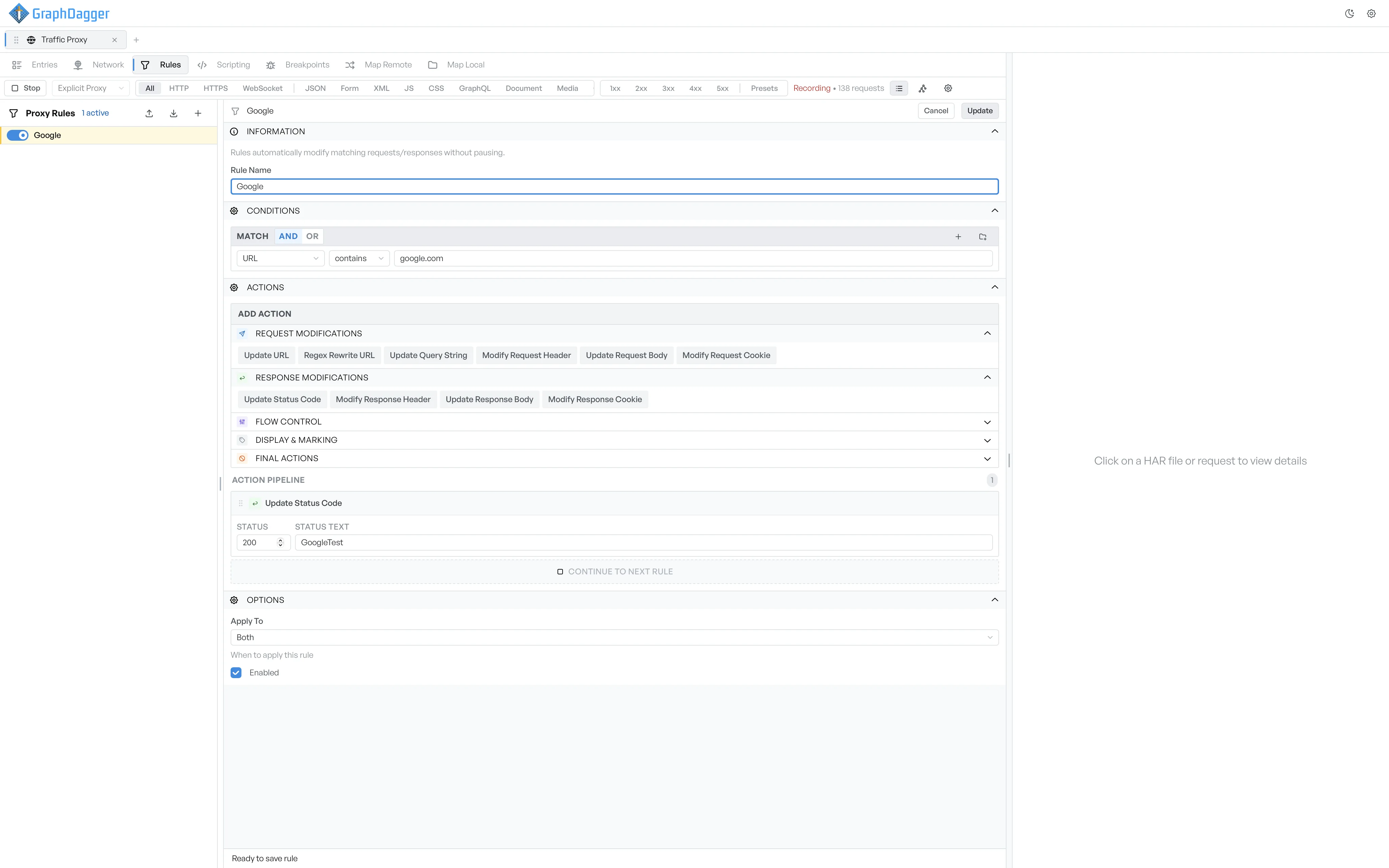
Request modifications#
These actions change the outgoing request before it reaches the server.
- Update URL: replace the request URL.
- Regex Rewrite URL: rewrite the URL with a regex pattern and a replacement.
- Update Query String: set or replace query parameters.
- Modify Request Header: add, replace, or remove a request header.
- Update Request Body: replace the request body, with a content-type selector.
- Modify Request Cookie: add, replace, or remove a request cookie.
Response modifications#
These actions change the incoming response before it reaches the client.
- Update Status Code: replace the status code, with an optional status text.
- Modify Response Header: add, replace, or remove a response header.
- Update Response Body: replace the response body, with a content-type selector.
- Modify Response Cookie: add, replace, or remove a response cookie.
Flow control#
These actions change the timing or the flow of the exchange. They do not change the bytes.
- Trigger Request Breakpoint: pause the request, as if a matching breakpoint had fired.
- Trigger Response Breakpoint: pause the response.
- Delay Request: hold the request for a configurable number of milliseconds.
- Throttle Bandwidth: cap the download rate and the upload rate, with a fixed-latency component.
- Do Not Decrypt HTTPS: skip TLS interception for matching requests, so they pass through opaquely.
Display and marking#
These actions change how the entry looks in the UI. They do not change what the proxy sends.
- Mark Session: tag the entry with a colour (red, orange, yellow, green, blue, purple, gray) and an optional comment.
- Add Comment: attach a free-text comment to the entry.
- Do Not Show in UI: hide matching entries from the entries list. Marked final.
Final actions#
These actions resolve the request directly. They are marked final, so the pipeline stops after one of them runs.
- Block Request: drop the request without sending it.
- Return File: respond with the contents of a file on disk, with a content-type selector.
- Return Directory: map the request URL into a directory on disk and respond from there, similar to Map Local. Has fields for Local Directory, Strip Prefix, and Fallback File.
- Return Custom Response: respond with a status code, a status text, and an inline body.
- Return Predefined Response: respond with a built-in canned response, for example a generic 200 OK or a 404.
- Close Gracefully: end the connection cleanly.
- Close Non-Gracefully: drop the connection abruptly.