What each format tab shows#
Matching magic bytes add a parser tab to the centre column, one each for executables, documents, email, archives, and obfuscated PowerShell.
A format-specific tab appears in the centre column when the active file's magic bytes match a format the analyser knows about. This page lists every format-specific tab, says when it appears, and summarises what it shows.

The always-present tabs are Overview, Static, Carving, YARA, Graph, and Content. A format tab, like the Mach-O tab above, slots in next to them only when its parser produces a result for the file.
Executable formats#
- PE appears for Windows Portable Executable files. It shows the section table, headers, imports and exports, the import hash, the entry point, the rich header, the Authenticode signature, and any flagged anomalies (renamed sections, packer indicators, oversized sections).
- ELF appears for Linux executables and libraries. It shows the program and section headers, the dynamic table, the build ID, and the imports.
- Mach-O appears for macOS binaries. It shows the load commands, the segments and sections, the dependent libraries, and the code signing summary.
Document formats#
- PDF appears for PDF files. It shows the catalogue, page tree summary, fonts, embedded files, JavaScript actions, launch and submit-form actions, and any objects flagged as suspicious.
- OOXML appears for
.docx,.xlsx, and.pptx. It shows the package parts, the content types, and any external reference in the document. - RTF appears for Rich Text Format files. It shows the structure, embedded objects, and any control words flagged as risky.
- OLE appears for the legacy Compound File format used by
.doc,.xls,.msg, and.msi. It shows the directory entries, streams, and any embedded payloads. - VBA appears when an Office document holds VBA macros. It shows the decompressed source of every module, and it tags risky keywords.
Mail formats#
The Email tab appears for RFC 5322 / MIME messages, including raw .eml. It is the richest format tab. It helps you spot a spoofed or malicious message at a glance.
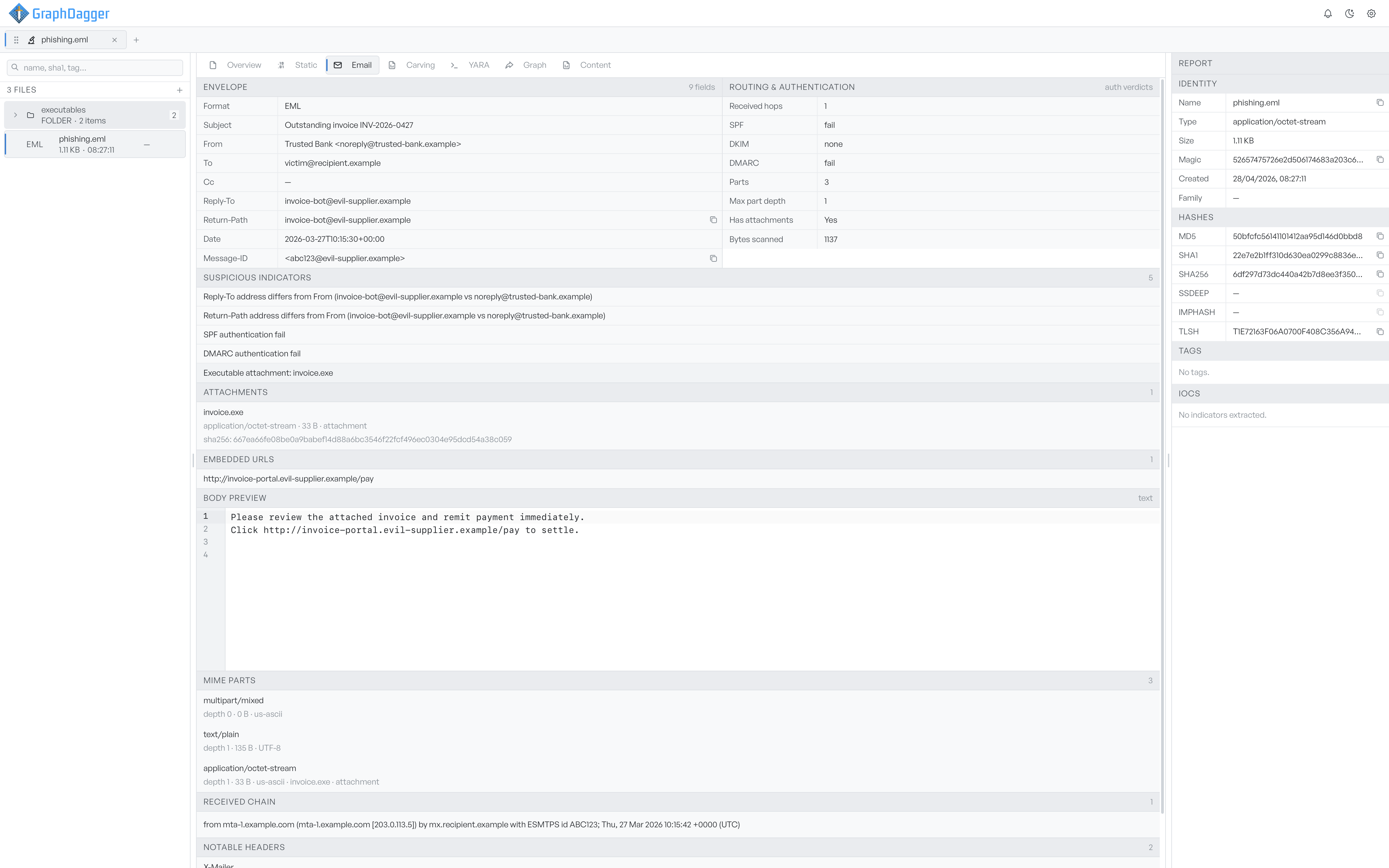
- Envelope lists the parsed header fields: subject, from, to, cc, reply-to, return-path, date, and message ID.
- Routing & authentication shows the received-hop count, the SPF, DKIM, and DMARC verdicts, the MIME part count and depth, and the attachment state of the message.
- Suspicious indicators collects the signals worth acting on, such as a reply-to or return-path that differs from the from address, an SPF or DMARC failure, or an executable attachment.
- Attachments lists each attachment with its type, size, and SHA-256.
- Embedded URLs lists the links found in the body.
- Body preview, MIME parts, Received chain, and Notable headers round out the raw structure of the message.
Archive formats#
- 7z appears for
.7zarchives. It walks the central directory and lists entries with their methods, encryption, and any flagged paths. - TAR appears for
.tar,.tar.gz, and.tar.zst. It walks every entry header and shows modes, symlinks, and any flagged paths. - CAB appears for Microsoft Cabinet files. It shows folders and file entries, compression methods, and attribute flags.
- ISO appears for ISO 9660 images. It shows the volume metadata, the boot record, and the root directory walk, including Joliet entries.
- MSI appears for Windows Installer databases. It shows the summary information, decoded MSI tables, and any custom action or binary blobs.
Script obfuscation#
The PowerShell tab appears when the analyser detects obfuscated PowerShell. It shows decoded payloads from base64 sequences, [char]N chains, -bxor and reversal flags, and the deobfuscated source.
When a format tab appears#
A tab appears when the format-specific parser produces a result for the file. If the magic bytes look like a PDF but the parser fails to read the catalogue, no PDF tab appears. File Triage shows the error in Key findings instead.