What the Static tab reads#
Confirm what kind of file you hold from its byte ratios, magic bytes, entropy bucket, and the first 64 bytes in hex.
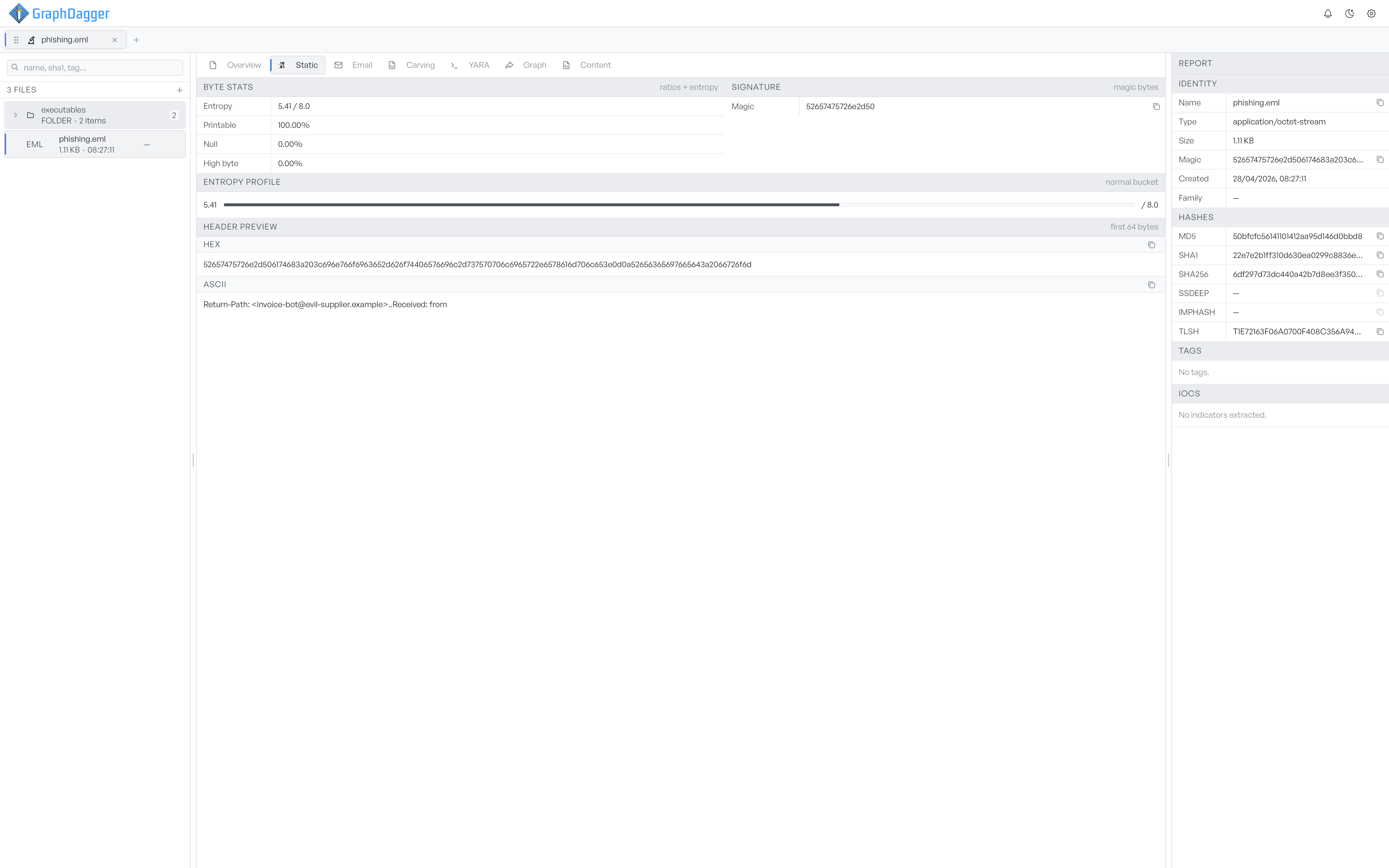
The Static tab shows everything the analyser reads directly from the file's bytes. It does not parse format-specific structures. Use the tab to confirm what kind of file you have, and to spot raw signs of obfuscation.
Byte stats#
The Byte stats card collects four numbers. The analyser derives all four from a single pass over the bytes.
- Entropy in bits per byte, on a 0 to 8 scale. A higher value means a more uniform byte distribution, which hints at compression or encryption.
- Printable is the percentage of bytes in the ASCII printable range.
- Null is the percentage of zero bytes.
- High byte is the percentage of bytes above 0x7F.
Signature#
The Signature card shows the file's magic, the first bytes as hex. A copy button puts the hex on your clipboard.
The analyser uses the magic to pick a format-specific parser. If a file's magic does not match any known format, the format-specific tabs do not appear.
Entropy profile#
The Entropy profile card shows the same entropy value as the Byte stats card, but as a horizontal bar from 0 to 8. A bucket label names the range.
The four buckets are descriptive, not verdicts.
- low bucket: under 1.0 bits per byte.
- normal bucket: between 1.0 and 6.5.
- high bucket: between 6.5 and 7.5.
- packed bucket: at 7.5 or above.
A packed bucket reading on a file that is not an archive is a useful signal. It means the bytes look uniform enough to be packed or encrypted.
Header preview#
The Header preview card shows the first 64 bytes of the file in two rows.
- HEX is the raw hex of the bytes.
- ASCII is the same bytes as printable ASCII, with a dot in place of each non-printable byte.
A copy button to the right of each row puts the value on your clipboard. Use this view to confirm the magic, to read strings near the start of the file, or to check a custom header. The card appears when the analyser reads at least the first 8 bytes.
Archive summary (ZIP only)#
When the active file is a ZIP archive, an Archive summary card appears below the Header preview. It lists the entry count, the encryption state of the entries, the total and compressed sizes, the deepest folder level, and the compression methods. A Suspicious paths card follows when the archive holds a path that the parser flagged, such as path traversal (../) or an absolute path.