What carving finds#
Three passes hunt for embedded file signatures, uniformly random regions, and polyglot bytes, and the tab appears only when one of them hits.
The Carving tab finds things that are inside a file but were not declared as part of its structure: embedded executables, uniformly random regions, and bytes that match more than one format at the same offset.
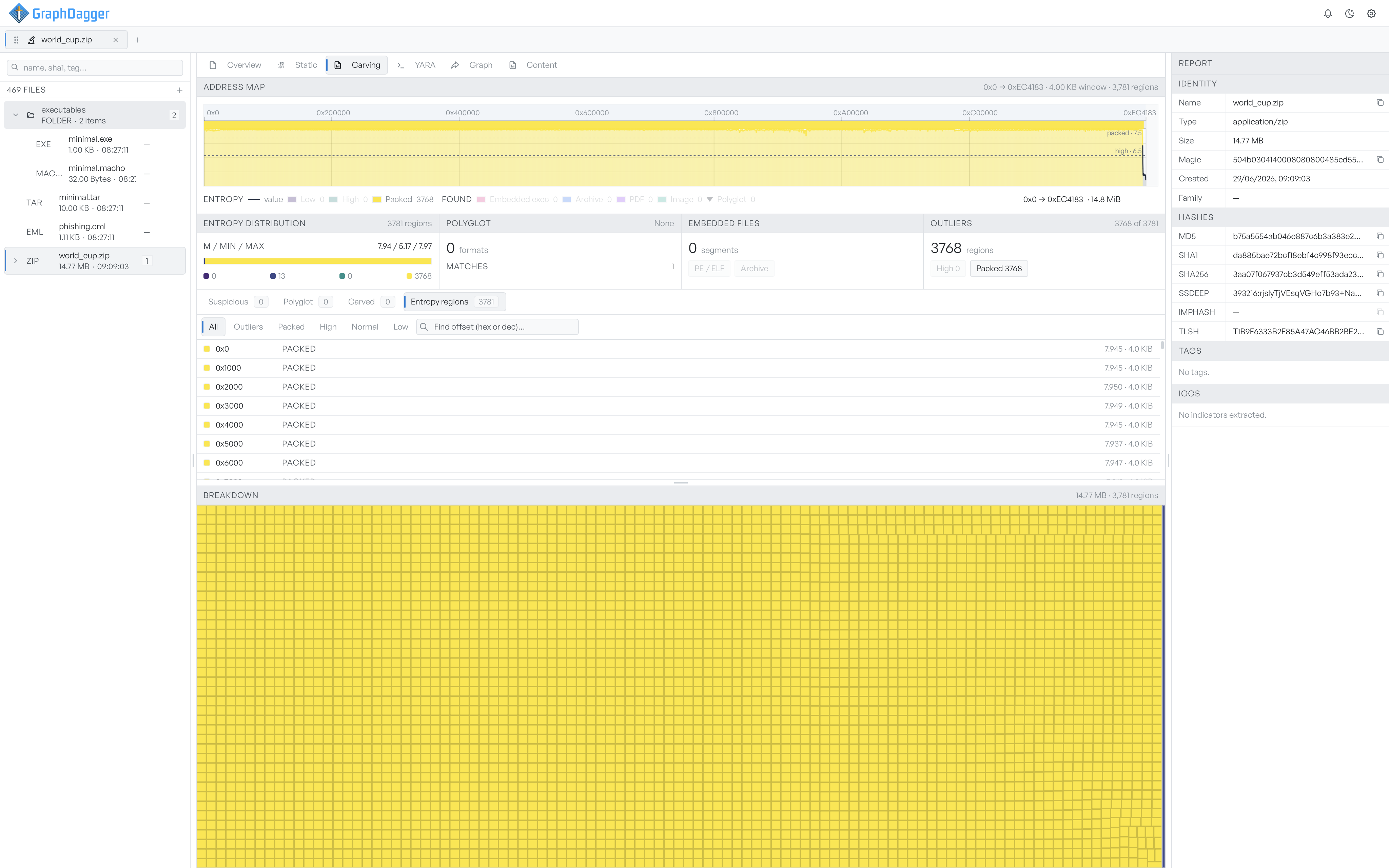
What carving looks for#
Three independent passes feed this tab.
- Embedded file signatures: a sliding-window scan that flags the magic bytes of known formats inside the file. A PE inside a ZIP, a JPEG appended to a document, a script glued onto an installer.
- Entropy regions: a pass that segments the file into regions by entropy bucket. The pass keeps and shows the high and packed regions.
- Polyglot detection: bytes that satisfy the parser for more than one format. The clearest case is a PE/ZIP polyglot used to smuggle a payload through tools that inspect only one format.
When the tab appears#
Carving runs as part of the default pipeline. The tab appears only when carving produced something to look at. If the file is plain ASCII text with no embedded content, the tab does not appear. The trigger conditions are an embedded segment, any entropy region, or a polyglot match.
Pages in this section#
- Address map covers the timeline-style heatmap and the stats bar at the top.
- Findings covers the categorised region lists in the middle.
- Breakdown covers the treemap and hex bytes view at the bottom.