What the generator builds#
Describe a credential as JSON and get a real signed one back, including the deliberately broken kind you need to test that something rejects it.
Generate is Decode run backwards. You describe the credential you want as JSON, and Auth Inspector assembles and signs the real thing: a valid JWT, a Base64 SAML response, a complete authorisation URL, or a certificate and its private key.
This is how you get a test credential with the exact properties you need, including the awkward ones: a token that expired yesterday, an assertion with no signature, a certificate with a key too short to be acceptable. Build a bad credential deliberately, and you find out whether the system consuming it actually rejects it.
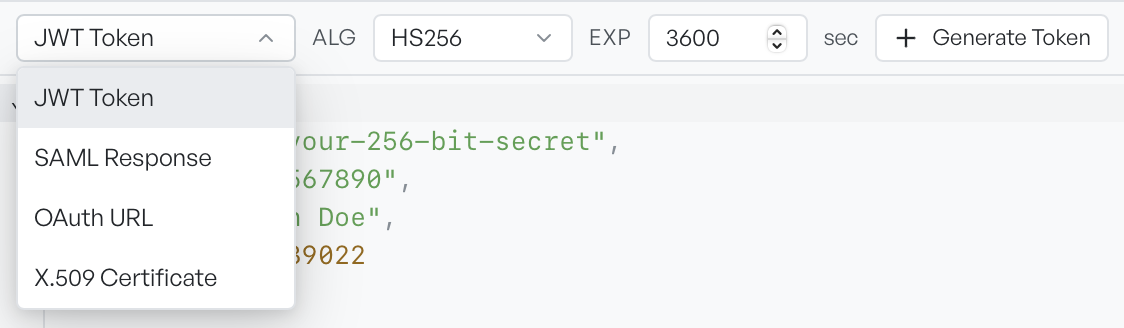
The JSON editor, not a form#
You edit the configuration as a JSON document, not as a set of labelled fields. That is deliberate. A form offers only the fields someone thought of, whereas any claim, attribute, or parameter you can name goes straight into the output.
The editor knows the schema for the type you selected. Type a key, and the editor suggests the valid keys for that credential. Each suggestion carries a short description, and the accepted values where the field is an enumeration. The editor leaves out keys already present in the document.
Every type starts with a working default. You can produce a valid credential at once and edit from there, rather than build one from an empty document.
What each type produces#
| Type | Button | Output |
|---|---|---|
| JWT Token | Generate Token | A signed compact JWT |
| SAML Response | Generate SAML | Base64 and a readable XML preview |
| OAuth URL | Build URL | The authorisation URL, plus the PKCE pair when enabled |
| X.509 Certificate | Generate Cert | The certificate and its private key as PEM blocks |
Auth Inspector cannot generate Kerberos tickets. It can only decode them, because a key distribution centre has to issue a real ticket.
The output panel stays hidden until there is something to show. You can drag it taller. You can copy every output, and you can send most of them straight back into Decode to read what you built.
Warning Generated credentials are real and signed, not mock-ups. Treat every private key and secret produced here as test-only material, and do not point a generated certificate at anything that matters.