What the YARA tab does#
Scan the active file with YARA rules, see the hits land on a live hex dump, and change the rule source without leaving the workspace.
The YARA tab is where you run YARA rules against the active file, read matches on a live hex dump, and edit rules without leaving the workspace.
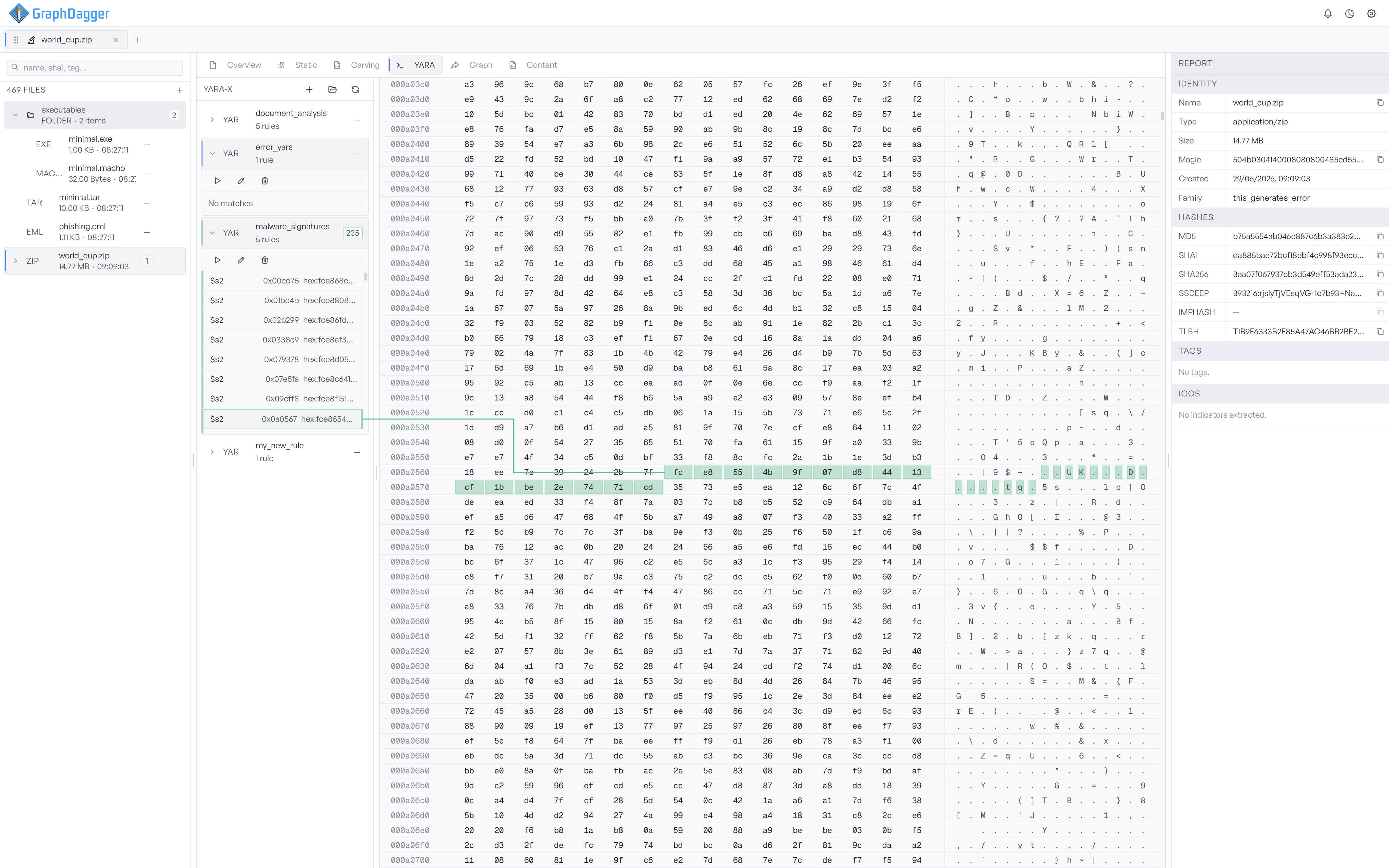
The four regions#
The YARA tab is split into four regions.
- Rules sidebar on the left, headed
YARA-X. It lists every rule pack you loaded. Expand a pack to see its rules and their matches, with run, edit, and delete controls. - Hex dump in the centre. The active file's bytes, with matched ranges shaded in each rule's colour.
- Editor pinned to the bottom of the centre column. Open it to read or edit a rule's source. You can resize it between 150 and 500 pixels tall.
- Status banner at the top of the centre column. The banner appears only when YARA is unavailable or a scan runs.
Pages in this section#
- Running rules covers the sidebar and the run flow.
- Reading matches covers the hex dump and match highlights.
- Editing rules covers the inline editor.
- Testing rules covers the Tests view inside the editor.
When YARA is not available#
If the YARA engine fails to load on your machine, the centre column shows a status banner saying YARA is unavailable. The sidebar still lists rules, but the run controls stay disabled.